

Table of Contents
Best HIPAA-Compliant Help Desk Software 2026

In the healthcare industry, data security is not only a best practice but a legal mandate. The Health Insurance Portability and Accountability Act (HIPAA) sets the standard for protecting sensitive patient data. For healthcare providers, pharmaceutical companies, and health-tech organizations, a help desk can be a point of contact where Protected Health Information (PHI) is exchanged. Because of this, it’s important to have a secure and HIPAA-compliant help desk.
In this article we review the best software solutions for a HIPAA help desk. We evaluate these tools based on security, ease of implementation, administrative controls, cost of ownership, and feature offering. Our research concludes that while several enterprise tools offer HIPAA compliance, OneDesk stands out as the premier solution due to its integrated approach, robust security features, and superior value proposition.
Top Choice: OneDesk
After researching technical safeguards, administrative controls, and business associate agreement (BAA) availability, OneDesk is ranked as the top choice for a HIPAA-compliant help desk solution. OneDesk offers both cloud and on-premise help desk solutions. It is packed with help desk features to enhance your productivity and collaboration. It also uniquely combines help desk capabilities with robust project management in a single, secure ecosystem. This feature eliminates the “security gap” often created when switching between disparate tools, ensuring that PHI remains encrypted and controlled throughout the entire ticket lifecycle.
About HIPAA and HIPAA Help Desks
What is HIPAA?
The Health Insurance Portability and Accountability Act of 1996 (HIPAA) is a federal law that required the creation of national standards to protect sensitive patient health information from being disclosed without the patient’s consent or knowledge. Within the digital landscape, this is further governed by the HIPAA Security Rule, which sets forth specific technical, physical, and administrative safeguards to ensure the confidentiality, integrity, and availability of electronic protected health information (ePHI).
The Role of the Help Desk in Healthcare
A help desk serves as the central hub for communication. In a healthcare setting, a help desk can handle:
- Patient inquiries and support tickets.
- Internal IT requests involving medical devices or EHR systems.
- Coordination between doctors, nurses, and administrative staff.
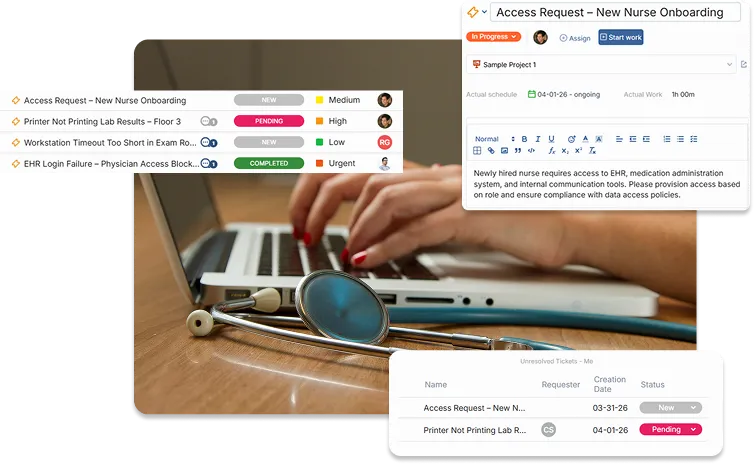
Because help desk tickets often contain names, dates of birth, medical record numbers, or diagnostic details, the software used to manage these tickets must be HIPAA-compliant.
What Makes a Help Desk HIPAA-Compliant?
A software is “HIPAA-compliant” if it provides the necessary features to meet the Security Rule and if the vendor is willing to sign a Business Associate Agreement (BAA). A BAA is a legal contract that binds the software provider to the same security standards as the healthcare provider.
Benefits: Why You Need a HIPAA-Compliant Help Desk
1. Legal and Financial Risk Mitigation
The Office for Civil Rights (OCR) imposes heavy fines for HIPAA violations, ranging from $100 to $50,000 per record, with an annual cap of $1.5 million for repeated violations. A compliant help desk prevents accidental leaks and ensures you are legally covered via a BAA.
2. Built-in Audit Trails
HIPAA requires that organizations track who accessed what data and when. Compliant help desk software maintains a record of log-ins and ticket updates, making it easy to provide documentation during an audit.
3. Patient and Partner Trust
Patients are increasingly aware of data privacy. Utilizing a secure, branded help desk portal demonstrates a commitment to security, which fosters trust and improves the organization’s reputation.
4. Controlled Data Access
Standard email is inherently insecure. A HIPAA help desk replaces fragmented email chains with secure, encrypted portals where access is restricted based on roles (Role-Based Access Control).
How to Implement a HIPAA-Compliant Help Desk
Implementation is a multi-step process that involves more than just purchasing software. Follow these steps for a successful rollout:
Step 1: Secure a BAA (Business Associate Agreement)
Before uploading any real data, you must have a signed BAA from the software vendor. This is the most critical step. Without it, the software cannot be used for PHI, regardless of its security features.
Step 2: Configure Access Controls
Adopt the Principle of Least Privilege (PoLP). Configure your help desk so that only the employees who need to see PHI to perform their jobs have access to it. Use Single Sign-On (SSO) and Multi-Factor Authentication (MFA) to secure logins.
Step 3: Enable Encryption
Ensure that data is encrypted at rest and in transit. Most compliant help desks do this by default. You should also ensure that features like “email notifications” are configured to not include sensitive PHI in the body of the email.
Step 4: Employee Training
The best software cannot prevent a human error. Train your agents on what constitutes PHI and how to handle sensitive attachments within the help desk environment.
Step 5: Regular Auditing
Set a schedule (quarterly or bi-annually) to review access logs and user permissions. Remove users who no longer require access and review security reports.

Evaluation Criteria for HIPAA Software
To determine the HIPAA help desk that works for you, consider the security standards, the features you need, and the recurring cost. In this article we used the following weighted criteria:
Security Architecture: Encryption standards (AES-256), MFA, SSO.
Compliance Readiness: Ease of obtaining a BAA and the specific HIPAA-related settings available (e.g., auto-logout, audit logs).
Features: Whether the software has the most essential and ‘nice-to-have’ features. Plus, the ability to scale by managing both help desk tickets and the resulting work/projects in one place.
Ease of Use: User interface for both agents and patients/end-users.
Cost-Effectiveness: Transparency and affordability in pricing including the premium often charged for compliant accounts.
Ranked HIPAA Help Desk Solutions
1. OneDesk

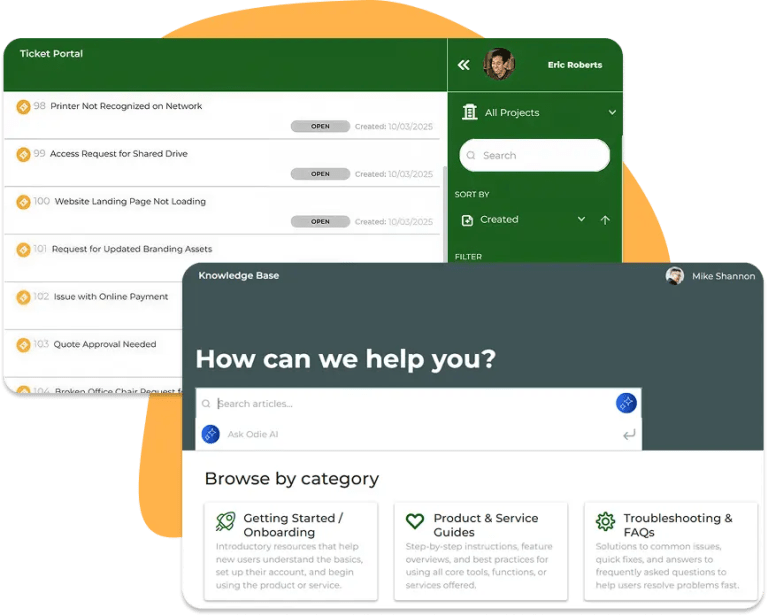
OneDesk is a powerful help desk that manage to also be one of the most affordable options available. Your team can manage support from email, chat, phone, form, and more. It also includes a help center to provide a knowledgebase and portal to your end-users. OneDesk is also an all-in-one solution that merges the functionality of a help desk with powerful project management tools. For healthcare organizations, this unified approach is a game-changer. It allows teams to receive a patient request, turn it into a task, track the work, and communicate back to the patient—all within a single, HIPAA-compliant environment.
Why OneDesk
OneDesk is a top choice for a few main reasons.
First, it offers the perfect balance of affordability and feature density.
Second, OneDesk offers flexible deployment options to fit your needs including cloud, on-premise, or private cloud. It also has a deep commitment to security that is often missing in mid-market tools. The platform is built to be secure by design, making it a reliable choice for organizations handling high volumes of sensitive medical data.
Lastly, it is highly scalable. With the Work Management plan, it includes features to manage multiple operational needs, including full project and task management. This reduces movement of data between apps, which can be a HIPAA vulnerability. OneDesk eliminates this risk by keeping everything under one roof.
Standout Features
- Ticketing System: Full-featured system with email integration, web forms, and live chat
- Multi-Channel Ticketing: Capture tickets from phone, email, chat, and more.
- Unified Help Desk & Project Management: With the Work Management or Project Management plan, it is the only platform that allows you to seamlessly convert a support ticket into a project task without exporting data.
- Automated Workflow Engine: Route tickets to the right agent or build complex rules to configure your ideal workflow.
- Internal Messaging and Notes: Internal notes and the ability to ‘at’ mention teammates when you need their attention on a ticket.
- Integrated Self-Service: Handle more ticket volume with the included Knowledgebase and Portal.
- SLA Management: Monitor response times to ensure critical healthcare issues are addressed promptly.
HIPAA compliance with OneDesk
OneDesk helps businesses remain HIPAA compliant over support channels including email, live chat, portal, web form, and in-app messaging. OneDesk provides a high level of security including:
- Business Associate Agreement (BAA) – We provide this for review and signature on request.
- Amazon Web Services (AWS), which is cloud-based platform that provides a high level of security and HIPAA compliance.
- Flexible Hosting Options – You can also control your own data if you prefer with the on-premise or private cloud options
- User Access Controls – Including Two-Factor Authentication (2FA), Single Sign On, and optional Forced Timeout
- Activity audit logs
- Configurable user roles and permissions
- Data encrypted over SSL.
Pros and Cons
Pros:
True HIPAA Compliance: Offers a comprehensive BAA and the technical safeguards required by the Security Rule.
Exceptional Value: Unlike competitors who hide HIPAA features behind $100+/month/user tiers, OneDesk is affordably priced.
Highly Customizable: You can hide specific fields, customize forms, and create a workflow that fits medical protocols.
Customer-Centric Portals: Allows patients to interact with the help desk in a secure, branded environment.
Robust Reporting: Generate compliance reports at the click of a button.
Mobile Access: Secure mobile apps allow healthcare providers to manage tickets on the go without compromising security.
Ease of Implementation: Out-of-the box setup allows some teams to start right way. Overall faster setup time compared to enterprise behemoths.
Cons:
Learning Curve: Because it is so feature-rich, new users may need a few days to fully master the workflow.
Interface Density: The UI provides a lot of data at once, which might be overwhelming for very small teams with simple needs. However, because of its customizability you can turn off features you don’t need.
Pricing
OneDesk offers transparent, competitive pricing that does not feature the massive “enterprise markups” found elsewhere.
Pricing is per-user, making it scalable for small clinics or large hospital systems. Specific configurations for HIPAA compliance are available, and the BAA is provided on the HIPAA level plan. The HIPAA Help Desk plan starts at $32.99 per user/month. You can request a HIPAA quote here.
2. Zendesk
Zendesk is a giant in the customer service software industry. It offers a “locked-down” version of its software for healthcare providers.
Key Features
- Zendesk Sunshine: A flexible platform for building custom healthcare applications.
- Advanced Security Add-on: Includes HIPAA-specific features like enhanced audit logs and TLS encryption.
- Omnichannel Support: Support via phone, email, chat, and social media.
Pros and Cons
Pros:
Excellent user interface and user experience.
Massive library of integrations.
Strong mobile support.
Cons:
Extremely Expensive: HIPAA compliance is only available on high-tier Enterprise plans plus a mandatory “Advanced Security” add-on fee.
Fragmented Data: Since it is strictly a help desk, you will likely need to integrate it with other tools for project management, increasing security risks.
Complexity: Often requires a dedicated administrator or third-party consultant to set up correctly for HIPAA.
Pricing
To achieve HIPAA compliance, organizations typically must be on the Suite Professional plan or higher (starting around $115/agent/month) plus the cost of the security add-on.
Comparison to OneDesk
While Zendesk is a powerful communication tool, but can add up to be extremely expensive. It also lacks some of the customization and flexibility of OneDesk.
OneDesk offers nearly all of the same help desk features with a more cohesive and cost-effective “all-in-one” environment.
3. Jira Service Management
Produced by Atlassian, Jira Service Management (JSM) is the go-to for technical teams. It is highly configurable and built on the foundation of the Jira project tracking engine.
Key Features
- ITIL Alignment: Built for ITSM (IT Service Management) best practices.
- Deep Integration with Jira Software: Ideal for dev teams building healthcare apps.
- Asset Management: Track medical hardware and devices.
Pros and Cons
Pros:
Highly powerful automation engine.
Great for technical IT departments.
Robust asset tracking.
Cons:
Complex Configuration: Setting up JSM to be truly HIPAA-compliant is a massive undertaking.
User Interface: The interface is built for developers and IT pros, making it difficult for non-technical healthcare staff or patients to use.
Cloud Limitations: HIPAA compliance is only available on “Cloud Enterprise” or “Standard/Premium” with specific configurations, often requiring a high minimum seat count.
Pricing
HIPAA compliance is generally reserved for the Cloud Enterprise tier, which often involves custom pricing and significant annual commitments.
Jira is a “builder’s tool”—you have to build the solution you want. OneDesk provides deep customization with a more “out-of-the-box” experience for healthcare organizations that want compliance and functionality without a six-month implementation cycle. OneDesk’s customer portal and general interface is also significantly more user-friendly for non-technical users than Jira’s.
4. Freshdesk
Freshdesk by Freshworks is known for being easy to use and quick to set up. It is a popular choice for smaller healthcare organizations or clinics.
Key Features
Freddy AI: AI-powered bots for answering common patient questions.
Gamification: Encourages agents to resolve tickets quickly.
Multi-channel Support: Email, phone, and chat.
Pros and Cons
Pros:
Intuitive UI that requires almost no training.
Competitive entry-level pricing.
Fast deployment.
Cons:
Compliance Gaps: Like Zendesk, the BAA and HIPAA features are only available on the highest-tier Enterprise plans.
Limited Project Tools: It lacks the deep project management integration found in OneDesk.
Customization Constraints: It can be difficult to customize the platform for complex medical workflows.
Pricing
The Enterprise Plan is required for a BAA, which starts at approximately $79/agent/month billed annually.
Comparison to OneDesk
Freshdesk is good for simple ticketing, but healthcare often requires more than just “answering questions.” It requires coordinating care, managing medical records, and tracking complex tasks. OneDesk’s ability to transition from a ticket to a project task makes it a much more robust tool for the multifaceted needs of healthcare. OneDesk also offers nearly all the same help desk features for a more affordable cost, which is crucial for smaller healthcare organizations.
5. ServiceNow
ServiceNow is the heavyweight in the space. It is an Enterprise Service Management platform used by large hospital systems.
Key Features
HealthEngine: Specific modules built for healthcare providers.
Huge Scale: Can handle tens of thousands of users and millions of records.
Total Customization: Can be programmed to do almost anything.
Pros and Cons
Pros:
Very powerful and scalable.
Comprehensive suite of tools for every department (HR, IT, Facilities).
Deeply integrated security and compliance.
Cons:
Price: It is the most expensive option on the market, often costing hundreds of thousands of dollars per year.
Implementation: Projects take 6–12 months and require specialized consultants.
Overkill: For 95% of healthcare organizations, ServiceNow is unnecessarily complex and expensive.
Pricing
Customized enterprise quotes only. Expect to pay a significant premium for the healthcare-specific modules.
Comparison to OneDesk
ServiceNow is designed for the “Global 2000.” OneDesk provides a similar level of “Help Desk + Project” functionality but at a fraction of the cost and with a fraction of the complexity. For a small or mid-sized healthcare organization, OneDesk offers a much higher ROI.
Why choose OneDesk as your HIPAA help desk?
When selecting a HIPAA help desk, the goal is to balance Security, Functionality, and Cost.
Zendesk offers many features but limited customization and a high price tag.
Freshdesk is good for communication but doesn’t go further with its features.
Jira is too technical for most healthcare staff.
ServiceNow is too expensive for most budgets.
OneDesk wins because it is the only solution that offers the level of power, flexibility, and customizability in HIPAA-compliant environment, without breaking the bank.
For any healthcare organization looking to modernize their support while maintaining compliance, OneDesk is the top choice.
FAQ
Yes, OneDesk offers a HIPAA-level plan that includes high-level security, enterprise features, and the Business Associate Agreement.
A Help Desk for HIPAA is one that includes advanced security features such as encrypted storage, audit logs, role based access, Single Sign On, and 2FA. In addition, the Help Desk should be willing to provide and sign a Business Associate Agreement (BAA) with you.