New UI Redesign
We have been hard at work updating our UI to give OneDesk a fresh, uncluttered look. Along with the clear changes in visuals, here are some other aspects of the Interface changes:
- Side-panels for all items, projects, timesheets, and more. Now when you click on the name or ID of an item, a tabbed detail panel will open on the right, allowing you to see the properties of the item without extra clicks. You can close the panel easily enough, if you want more real-estate to look at your lists, cards or other views. This new behavior is modeled after standards in Modern Enterprise apps, but if you are used to clicking on everything, you may need to update your habits.
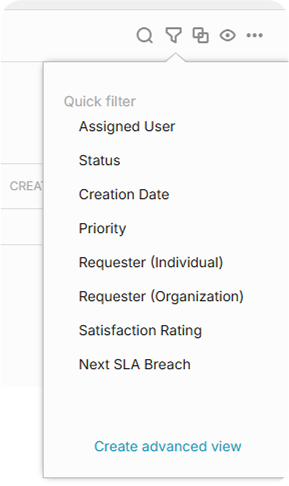
- New Quick-Access toolbar. Located above the grid on the right this menu offers options for common filters, groupings, view options and more.
- New Dark Theme (beta). This release of OneDesk introduces a new Dark theme. Your Administrator can enable this in your account, which will then instruct OneDesk to follow your browser settings. This theme is in Beta so if there are any issues let us know and we will correct them for the next release.
Customizable app sidebar
This release offers you more control over what apps are displayed on your left side-bar. You can now hide/show your apps, and re-order them. Please note the “Chat with OneDesk support” has now been moved to this side-bar.

Customizable Priority Labels
If you would prefer Labels for your priority instead of stars, that is now possible. Just as there were 6 star-ratings possible (0-5 stars), there are 6 priority levels you can label and color-code (0, 20, 40, 60, 80, 100).
New Options for managing your AI Agent conversations.
- Choose to allow the AI Agent to answer chats, when your team is online, or only when humans are offline.
- In the case where the AI is responding even though humans are available, customize the rules that trigger the handoff to your team.
- Detect conversations that are not being answered to the customer’s satisfaction and bring in a human agent.
- Additional options to provide your customer when the AI is responding:
- Optionally ask the customer to rate the AI response, with custom replies for good/bad
- Allow the customer to request a human when your team is online
- Suggest the Knowledgebase
- Suggest logging a ticket
Chat Transcript
Do you want to quickly send a client a transcript of a conversation? Now you can with a couple of clicks.
Other enhancements:
- Gantt chart improvements – Sorting, resizable columns, configurable columns, and much more
- Summary rows in reports – Add summary rows to your reports to calculate totals, counts etc.
- Color-coded kanban column headers – Nicer Kanban boards, colored to match your statuses
- New Automation Actions – assign to closer, to requester, to author
- New Permissions – Restrict user profile & notification changes, and joining teams
- New Filters – ‘Has open predecessors’, ‘Has satisfaction rating’, Quote Type,
- API – requester Org
- Quote type filter
- Has sat rating filter
- Add grouping to Quotes app
- New Automation templates
Plus over 400 other bug fixes and enhancements