Table of Contents
The Comprehensive Guide to AI Chatbot Software for Small Business Support
In the competitive landscape of small business operations, the bottleneck is rarely talent, but time. For B2B firms, Managed Service Providers (MSPs), and professional service agencies, every minute spent answering a repetitive technical question is a minute stolen from high-value project delivery.
AI-powered help desk chatbots have transitioned from “futuristic gadgets” to “operational necessities.” This guide serves as the definitive resource for small business owners and leaders looking to deploy AI chatbot software that doesn’t just “chat,” but actively manages workflows. OneDesk is a top choice for this transition, offering an unparalleled blend of Help Desk and Work Management at a price point designed for growth-oriented small businesses.
1. Understanding AI Help Desk Chatbots for Small Business
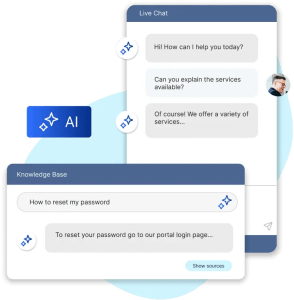
For a small business, an AI chatbot is more than a pop-up window on a website. It is an Automated Tier-0 Support Agent. Unlike traditional rule-based bots that rely on rigid “if-this-then-that” logic, modern AI chatbots utilize Natural Language Processing (NLP) and Large Language Models (LLMs) to understand the intent behind a client’s message.
The Evolution of the Small Biz Help Desk
Historically, small businesses had to choose between a basic email inbox or an enterprise-grade tool like Salesforce that was too expensive and complex.
AI chatbots within a platform like OneDesk bridge this gap by offering:
Intent Recognition: Understanding that “How do I add a user?” and “User seat help” are the same request.
Knowledge Base Synthesis: Scanning internal documentation to provide a concise, human-like answer in seconds.
Configurable Handoffs: Knowing exactly when a technical issue is too complex for AI and routing it to a human agent with a full summary of the interaction.
2. Strategic Alignment: Which Small Businesses Benefit Most?
While applicable to any organization, certain industries, particularly those in the B2B and professional sectors, see an immediate and dramatic ROI from AI chatbots.
B2B SaaS & Software Startups
The Landscape: These businesses deal with high-volume technical queries, feature requests, and onboarding hurdles.
The Challenge: A small team of developers often spends 30% of their day answering “How-to” questions.
The AI Impact: AI chatbots can handle 60% of technical troubleshooting by sourcing answers from the product documentation, allowing developers to focus on the product roadmap.
Managed Service Providers (MSPs) & IT Consultancies
The Landscape: MSPs manage the digital infrastructure of other businesses. Support is their primary product.
The Challenge: Simple requests like password resets or VPN access issues clutter the queue, delaying response times for critical server failures.
The AI Impact: By automating routine access requests and providing instant status updates on known outages, the AI keeps the human queue clear for high-priority disasters.
Professional Services (Legal, Accounting, Consulting)
The Landscape: These are high-trust, high-billable-hour environments.
The Challenge: Managing client intake, scheduling discovery calls, and providing status updates on documents is non-billable administrative work.
The AI Impact: Chatbots act as a 24/7 intake officer, qualifying leads and providing clients with real-time status updates on their cases or filings.
Industrial & Manufacturing B2B
The Landscape: Companies selling parts, machinery, or logistics services to other businesses.
The Challenge: Sales and support teams are frequently interrupted to provide shipping questions or technical spec sheets.
The AI Impact: Integrating the chatbot with a platform like OneDesk allows the bot to pull knowledge or technical PDF links instantly for the client.
3. The Operational Crisis: Challenges & Why They Matter
Small businesses face unique hurdles that make AI not just an “extra” but a “must-have.”
Challenge 1: The Support-to-Project Gap
In B2B, a support ticket (e.g., “I need a custom report”) often turns into a project task.
Why It Matters: Most software separates “Support” from “Projects.” This leads to data loss and frustrated clients who have to repeat themselves to a project manager after talking to a support agent.
How AI Helps: OneDesk solves this by allowing the AI to convert a chat transcript directly into a project task, maintaining a single thread of truth.
Challenge 2: The “Always-On” Global Expectation
Small businesses often have clients in multiple time zones but only have staff in one.
Why It Matters: A client who experiences a software “blocker” at 2:00 AM will feel neglected if they don’t get a response until 9:00 AM.
How AI Helps: The AI chatbot provides immediate triage and resolution at any hour, maintaining the professional “enterprise-level” image of the small business.
Challenge 3: Technical Debt in Support
As a small business grows, its documentation becomes fragmented (PDFs, internal Wikis, emails).
Why It Matters: New support hires take months to become “experts” because the knowledge is scattered.
How AI Helps: AI chatbots index all these sources. The AI becomes the “Source of Truth,” providing consistent answers regardless of which human agent is on shift.
4. OneDesk: The AI Chatbot & Help Desk Solution
For a small business, the software choice is critical. You need power and flexibility at a price that doesn’t hinder your cash flow. OneDesk is that solution.
The OneDesk Philosophy: Unified Efficiency
OneDesk is unique because it combines Help Desk (external client communication) with Project Management (internal work execution).
Affordability for Small Biz: Unlike competitors who charge for basic features, OneDesk offers an affordable pricing model.
Low Technical Barrier: You don’t need a coding background to set up automated workflows. The “No-Code” automation engine allows you to build complex routing rules in minutes.
Native Knowledge Base: OneDesk includes a built-in Knowledge Base. The AI chatbot is natively “plugged in” to this, meaning it gets smarter every time you write a help article.
5. Use Cases: Advanced Automations and B2B Workflows
To see the value of OneDesk, we must look at a workflow that drive efficiency.
Workflow Example: Technical Troubleshooting & Ticket Escalation
Interaction: A client says, “I can’t sync my data to the API.”
AI Action: The bot searches the Knowledge Base and provides the “API Troubleshooting Guide” link.
Human Handoff: If the client clicks “That didn’t work,” the bot says, “I’m escalating this to our Engineering team. Please upload your error log here.”
OneDesk Outcome: A ticket is created in OneDesk with the log file attached, assigned to the engineering project folder with a “High Priority” tag.
6. Performance & ROI: Key KPIs for AI Help Desks
Small businesses must justify every software expense. Tracking these KPIs will demonstrate the ROI of the OneDesk platform.
KPI | Description | OneDesk Impact |
Deflection Rate | % of queries resolved by AI without human intervention. | Typically 40-60% in B2B environments. |
First Response Time (FRT) | How long a client waits for the first reply. | Reduced to seconds via AI Chatbot. |
Resolution Time | Total time from ticket creation to closing. | Significantly lower as AI gathers all necessary data upfront. |
Agent Utilization | How much time agents spend on “deep work” vs. “ticket management.” | OneDesk automations handle the “management,” freeing agents for “work.” |
7. Customer Success Stories: Real-World B2B Impact
Case Study: The MSP Scale-Up
The Company: A 5-person IT firm managing 40 small businesses.
The Problem: The owner was spending 20 hours a week just “routing” tickets to the right technician.
The OneDesk Solution: They implemented the OneDesk AI chatbot to handle initial intake and automated ticket assignment.
The Result: The owner’s administrative load dropped by 80%. They took on 10 new clients without hiring a new dispatcher.
Case Study: The B2B Consultant
The Company: A financial consultancy dealing with complex tax compliance.
The Problem: Clients constantly called for updates on where their “audit project” stood.
The OneDesk Solution: They used the OneDesk Client Portal and AI chatbot. Clients could ask the bot, “What’s the status of my audit?” and the bot would pull the task percentage directly from the project sheet.
The Result: “Status Update” calls dropped by 90%, allowing the consultants to focus on billable tax work.
8. Comparative Analysis: Why OneDesk Wins for Small Biz
Feature | OneDesk | Zendesk | Intercom |
Integrated Project Mgmt | Yes (Native) | No | No |
AI Cost | Affordable per Query | High-tier Add-on | Very High / Per-Query |
Setup Complexity | Low (Hours) | High (Requires Consultant) | Moderate |
B2B Focus | High (Tasks/Tickets) | General / Retail focus | Marketing focus |
Pricing Model | Low per-agent | High Per-agent | Complex |
The Verdict: While Zendesk and Intercom are powerful, they are built for companies with massive budgets and dedicated “Support Ops” teams. OneDesk is built for the small business that needs to be productive today without a six-figure implementation cost.
9. Frequently Asked Questions (FAQs)
Actually, B2B clients value efficiency over small talk. Getting a technical answer in 30 seconds from a bot is preferred over waiting 4 hours for a "friendly" email.
If you already have a Knowledge Base or a list of FAQs, you can be up and running in a single afternoon. OneDesk’s AI is designed to "read and learn" instantly.
In addition to the knowledgebase the AI can also learn from your web pages. Plus, OneDesk makes it easy to create a knowledgebase. You can import articles from PDFs. And, as you answer tickets, you can generate articles and publish them to your Knowledge Base with one click, effectively training your AI in real-time.
Migration is generally straightforward as you are moving to a single platform. Most authoritative vendors, including OneDesk, offer import tools to bring in historical data from CSVs or previous help desk/PM tools.
10. Glossary of Terms
- NLP (Natural Language Processing): The “brain” of the AI that allows it to understand human speech patterns.
- Ticket Deflection: When a client’s problem is solved by the AI or Knowledge Base without a human agent ever seeing it.
- SLA (Service Level Agreement): The promised timeframe in which you will respond to a client. OneDesk automates these timers.
- Handoff: The seamless transition of a conversation from an AI bot to a human agent.
- Knowledge Base (KB): A digital library of your company’s “how-to” guides and policies.
- Triage: The act of sorting and prioritizing support requests based on urgency.
- Context: The history and data surrounding a client’s request that the AI passes to a human agent.
- Automation Engine: The logic within OneDesk that triggers actions (like sending an email or moving a task) based on specific events.
- Client Portal: A secure area where your B2B clients can track their own tickets and project progress.
For a small business in the B2B or professional services sector, your reputation is built on responsiveness and results. Utilizing AI chatbot software is not about “cutting corners” but about ensuring that your clients get the fastest possible service while your team stays focused on the work that drives revenue.
OneDesk offers the most comprehensive yet affordable solution for businesses ready to step into the future of automated support.