Table of Contents
The Comprehensive Guide to Work Management Software for Education: Unifying Campus Operations
Educational institutions, from K-12 school districts to large university campuses, operate like small cities. They manage IT infrastructure, maintain physical facilities, process admissions, coordinate events, and support thousands of students, faculty, and staff.
Yet, in many institutions, these operations are managed in silos. IT uses a ticketing system, Facilities uses a maintenance app, and Admissions lives in spreadsheets. This fragmentation leads to lost data, inefficient spending, and a disjointed experience for students and staff.
This guide explores Work Management Software for Education, a unified approach to managing the diverse operational needs of educational institutions. We will examine how platforms like OneDesk are helping schools break down silos by combining Help Desk (Service) and Project Management (Strategy) into a unified process.

1. What is Work Management Software for Education?
Work Management Software for Education is a central ecosystem used to capture, organize, and execute the operational tasks required to run an educational institution.
Unlike a standalone Learning Management System (LMS) like Canvas or Blackboard, which focuses on teaching, Work Management Software focuses on administration and support services.
It handles these two distinct types of work:
Reactive Support (Ticketing): “My login isn’t working,” “There is a leak in Hall B,” “I need a transcript.”
Proactive Projects (Planning): “Summer Computer Lab Refresh,” “Fall Orientation Planning,” “Curriculum Review Cycle.”
The Convergence of Tools
Historically, schools bought separate software for every department or need.
OneDesk uses a modern unified approach. It allows a university to have a single portal where someone can request IT support or propose a new research project, all effectively routed within one system.
2. Who Uses Work Management Software? (Teams & Challenges)
The user base in an educational environment is unique because it can include internal staff or a rotating base of external users (students/parents).
A. Information Technology (IT) Departments
This department generally manages the network, hardware, software licenses, and cybersecurity.
The Challenge: Volume and Seasonality. The beginning of the semester brings a flood of password resets and Wi-Fi connection issues.
Why it Matters: If students can’t connect, they can’t learn. If faculty can’t project slides, classes stall.
How to Overcome: Implementation of Self-Service Portals and AI Deflection.
The OneDesk Solution: OneDesk’s AI Chat Agent acts as the frontline defense, answering repetitive “How do I connect to Wi-Fi?” questions instantly using the Knowledgebase, reducing ticket volume by up to 40%.
B. Facilities & Campus Operations
This department performs maintenance, custodial services, event set-up, and groundskeeping.
The Challenge: Mobile Coordination. A janitor or maintenance tech is rarely at a desk. They need work orders on the go.
Why it Matters: A broken heater in a dorm or a safety hazard in a playground needs immediate attention for liability and comfort.
How to Overcome: Mobile-first work management.
The OneDesk Solution: OneDesk’s Mobile App allows field staff to receive notifications, snap photos of the repair, log their time, and close the ticket right from the location.
C. Admissions & Enrollment Management
This department handles processing applications, answering prospective student queries, and managing enrollment events.
The Challenge: Pipeline Visibility. Treating students like “leads” requires tracking conversations and documents over months.
Why it Matters: Enrollment numbers drive funding. Losing a prospective student due to a slow email response is costly.
How to Overcome: CRM-lite capabilities with automated follow-ups.
The OneDesk Solution: Admissions can use OneDesk to track inquiries as tickets. Automated Workflows can send follow-up emails: “Thanks for your question! Here is our brochure,” ensuring no inquiry slips through the cracks.
D. Instructional Design & Academic Technology
This department helps faculty build courses, digitize curriculum, and implement new teaching tech.
The Challenge: Project Complexity. creating a new online course is a project with dependencies (Drafting -> Video Recording -> Editing -> LMS Upload).
Why it Matters: Quality of education depends on modern delivery methods.
How to Overcome: Gantt charts and Project Planning tools.
The OneDesk Solution: OneDesk includes robust Project Management. Teams can map out course development on a Gantt Chart, assigning tasks to video editors and professors with clear due dates.
3. The Critical KPIs for Education Operations
To justify software investment, administrators must track performance.
| KPI | Definition | Why it matters in Education | How OneDesk Helps |
| First Contact Resolution (FCR) | % of issues resolved in the first interaction. | High FCR means students aren’t bouncing between departments. | AI Knowledgebase Search helps users solve their own issues before submitting tickets. |
| SLA Compliance Rate | % of requests resolved within the promised time. | Critical for IT (classroom downtime) and Facilities (safety hazards). | Automated SLA Timers alert managers before a deadline is breached. |
| Resource Utilization | How many hours staff spend on tasks. | Schools operate on tight budgets; overtime must be minimized. | Built-in Time Tracking and Timesheets show exactly where staff effort goes. |
| Ticket Volume by Category | Breakdown of request types (e.g., 50% Password Resets). | Identifies areas for systemic training or infrastructure repair. | Custom Report Generator visualizes trends to inform budget decisions. |
4. What to Look for in Work Management Software for Education
When evaluating tools, look for these specific criteria.
1. Unified Architecture (The “All-in-One”)
Avoid buying separate tools for Ticket Management and Project Management. Education teams often need to convert a Support Ticket into a Project.
OneDesk Capability: Seamlessly converts tickets to tasks/projects without data loss.
2. Unlimited “Customer” Access
In a university setting, you have 20,000+ students. Paying “per seat” for every student to access the portal is financially impossible.
OneDesk Capability: Unlimited Customers. You only pay for the staff (agents) managing the work. Students, faculty, and parents can access the portal for free.
3. Data Privacy & Role-Based Access
You must separate sensitive data. A student worker in the IT department should not see tickets regarding HR disputes or Faculty grades.
OneDesk Capability: Granular Role-Based Access Control. You can create “Teams” (IT, HR, Facilities) and ensure they only see their own data, while a “Super Admin” sees the big picture.
4. Omnichannel Intake
Students prefer Chat; Faculty prefer Email; Staff might prefer a Form. The system must capture all of them.
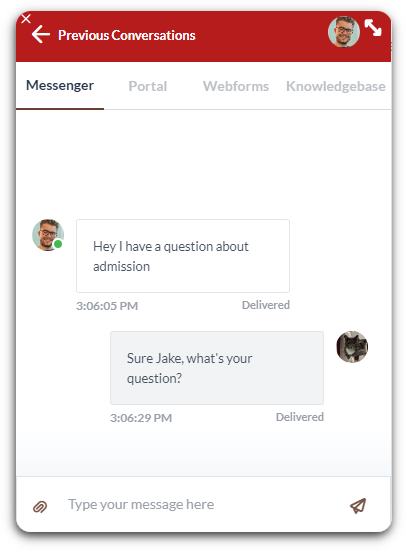
OneDesk Capability: Captures requests via Email, Live Chat, Webforms, Customer Portal, and Phone, centralizing them into one queue.
5. OneDesk for Education: A Deep Dive
OneDesk is uniquely positioned for the education sector because it combines the flexibility of enterprise service management with the user-friendliness required for academic environments.
The Student/Faculty Portal
OneDesk provides a customizable, white-labeled portal.
This acts as a hub. A student logs in and sees a menu to report an issue request maintenance, etc.
Before they submit the form, OneDesk’s AI suggests relevant Knowledgebase articles, deflecting the ticket entirely.
Automated Triage (Routing)
With OneDesk, you don’t need a human dispatcher reading every email.
You set up rules:
If email contains “Leak” or “Broken” -> Assign to Facilities Team.
If email contains “Login” or “Password” -> Assign to IT Team.
If email sender is “@alumni.edu” -> Assign to Alumni Relations.
Project Planning for Academic Calendars
Schools live by the calendar (Semesters/Terms).
Feature: OneDesk’s Gantt Charts and Agile Boards.
Use Case: Planning “Fall Move-In Day.” This is a massive project involving security, housing, IT, and facilities. OneDesk allows you to map dependencies (e.g., “Keys cannot be issued until room inspection is marked Complete”).
6. Strategic Use Cases: Automations & Workflows
Here is how OneDesk transforms daily campus chaos into order.
Scenario A: The New Hire (Faculty Onboarding)
The Problem: Hiring a new professor involves HR (Contract), IT (Email/Laptop), Facilities (Keys/Office), and Security (ID Card). Usually, this is done via 50 emails.
The OneDesk Workflow:
Trigger: HR submits a “New Faculty Form” in OneDesk.
Automation: OneDesk launches a Project Template called “Faculty Onboarding.”
Action:
Task 1 created for IT: “Provision Email” (Due: 2 days).
Task 2 created for Facilities: “Issue Office Keys” (Due: 1 day).
Task 3 created for Security: “Print Badge” (Due: 3 days).
Result: All departments work in parallel. HR tracks progress on the dashboard.
Scenario B: The “End of Semester” Rush
The Problem: Finals week triggers a massive spike in LMS support requests.
The OneDesk Workflow:
Trigger: Ticket subject contains “Blackboard” or “Canvas.”
Automation: Auto-reply sent with “Top 5 Exam Troubleshooting Tips” article linked.
Action: If the student replies “Still stuck,” the ticket priority is raised to Urgent and routed to the “LMS Specialist” group.
Result: Simple issues are solved by the auto-reply; critical exam issues get immediate expert attention.
Scenario C: Facilities Preventive Maintenance
The Problem: Waiting for things to break before fixing them.
The OneDesk Workflow:
Setup: Create a Recurring Task: “Inspect Fire Extinguishers – Science Hall.”
Schedule: Set recurrence to “Monthly, First Monday.”
Automation: When the task is created, assign to “Safety Officer” and notify via Mobile App.
Result: Compliance is documented automatically; safety is maintained.
Comparison: OneDesk vs. The Market
Educational institutions often find themselves paying for separate tools for IT (Jira), General Support (Zendesk), and Projects (Asana). The chart below illustrates why OneDesk is the superior “All-in-One” choice for a campus-wide deployment.
| Feature | OneDesk | Jira Service Mgmt | Zendesk | Asana |
| Primary Architecture | Unified (Projects + Service Desk) | DevOps / IT Focused | Customer Support Focused | Project Management Only |
| Best Used For | Entire Campus (IT, Facilities, Admin) | Software Development / IT | External Call Centers | Marketing / Admin Teams |
| Project Management | Native (Gantt, Kanban, WBS) | Good (Requires complex config) | None (Support tickets only) | Excellent |
| Service Desk (Ticketing) | Native (Email, Chat, Portal) | Native | Excellent | None (No email ingestion) |
| Pricing Model | Unlimited Students/Faculty (Free) | Per-Agent (Add-ons stack up) | Expensive per-agent costs | Per-User Seat |
| Ease of Adoption | High (One Interface) | Low (Steep learning curve) | Moderate | High (But incomplete) |
The OneDesk Advantage: Why it Wins in Education
VS. Jira: Jira is powerful but notoriously complex. While your CS professors might love it, your Facilities Manager or Registrar will likely struggle with the interface. OneDesk offers the power of Jira but with a user-friendly interface that any department can master quickly.
VS. Zendesk: Zendesk is good for answering questions, but it cannot manage the work that follows. If a student reports a broken window, Zendesk creates a ticket, but it cannot map the repair project, track the vendor, or schedule the inspection. OneDesk handles the ticket and the project lifecycle.
VS. Asana: Asana is a great project planner, but it lacks a Service Desk. It cannot take emails from students and turn them into tickets with SLA timers. Schools using Asana end up buying a separate Help Desk tool. OneDesk replaces the need to buy both.
Glossary of Terms
LMS (Learning Management System): Software for delivering educational courses (e.g., Canvas, Moodle). OneDesk often supports the users of the LMS.
SIS (Student Information System): The database of student records (grades, attendance).
Ticket: A record of a request or issue (e.g., “Broken Chair”).
Work Order: A specific type of ticket usually used by Facilities teams for maintenance tasks.
Knowledgebase (KB): An online library of help articles.
SLA (Service Level Agreement): A deadline for resolving issues (e.g., “Critical IT issues must be fixed in 4 hours”).
Gantt Chart: A visual timeline of a project.
Triage: The process of categorizing and prioritizing incoming requests.
SSO (Single Sign-On): Logging in with one set of credentials (e.g., University ID) across multiple platforms.
Self-Service Portal: A website where users can log tickets, check status, and read help articles without calling support.
Conclusion
For educational institutions facing budget constraints and rising service expectations, siloed and manual work is unsustainable.
OneDesk consolidates IT support, Campus Facilities, and Project Management into a single, AI-enhanced platform, so schools can achieve operational harmony. It allows staff to stop fighting fires and start focusing on the institution’s primary mission.
FAQ
Yes. You can create different "Ticket Types" (e.g., IT Incident, Work Order, Event Request). Each type can have its own unique workflows and custom fields.
No. OneDesk’s pricing is based on Agents (your staff). "Customers" (students, parents, faculty, alumni) are unlimited and free.
Yes, available for iOS and Android. It is particularly popular with Facilities teams for managing work orders in the field.
More about work management
Manage Your Client Approval Process
It’s common when managing projects that you need to sign-off with a client. For example, you might need them to approve a mock, document, or ...
Read More →
Expense Tracking with a PSA Tool
Managing any business comes with a lot of moving parts. One of the most challenging is actively and accurately tracking profit and expenses. If you’re ...
Read More →
Managing Project Intake for Service Businesses
Projects are super important to a service-based business. But the actual intake process can be complicated, usually due to a lack of organization and formal ...
Read More →
Moving From Spreadsheets to OneDesk: Why It’s Time to Upgrade
When you first start a business, spreadsheets are a great way to stay organized. They are flexible, easy to use, and free. But as your ...
Read More →