Table of Contents
The Ultimate Guide to HIPAA Helpdesk
Ensuring Compliance and Streamlining Healthcare Operations
In the intricate and regulated landscape of healthcare, the secure and efficient management of patient information is about both efficiency and a legal and ethical imperative. The Health Insurance Portability and Accountability Act (HIPAA) sets a standard for the protection of Protected Health Information (PHI), and any deviation can result in severe penalties and a breach of patient trust. As healthcare organizations increasingly rely on digital systems to manage patient interactions, support requests, and internal workflows, a HIPAA-compliant helpdesk solution is paramount.
This comprehensive guide will serves as your resource on HIPAA helpdesk software. We will delve into the intricacies of HIPAA, explore the critical role of a helpdesk in a healthcare setting, and provide a detailed roadmap for selecting and implementing a solution that not only ensures compliance but also enhances patient care and operational excellence.
1. Understanding HIPAA: The Foundation of Patient Privacy
To comprehend the significance of a HIPAA-compliant helpdesk, it is essential to first grasp the principles of the legislation itself.
What is HIPAA?
The Health Insurance Portability and Accountability Act of 1996 (HIPAA) is a U.S. federal law that was enacted to modernize the flow of healthcare information, stipulate how personally identifiable information maintained by the healthcare and healthcare insurance industries should be protected from fraud and theft, and address limitations on healthcare insurance coverage. HIPAA is divided into several sections, known as Titles, with Title II being the most pertinent to the discussion of helpdesk software as it establishes national standards for the privacy and security of health information.
The HIPAA Privacy Rule
The HIPAA Privacy Rule, officially known as the “Standards for Privacy of Individually Identifiable Health Information,” establishes national standards for the protection of individuals’ medical records and other personal health information. It applies to health plans, and to any health care provider who transmits health information in electronic form in connection with transactions for which the Secretary of HHS has adopted standards. The Privacy Rule addresses the use and disclosure of an individual’s protected health information (PHI) by covered entities. A primary tenet of the Privacy Rule is the “minimum necessary” standard, which requires covered entities to make reasonable efforts to limit the use or disclosure of, and requests for, PHI to the minimum necessary to accomplish the intended purpose.
The HIPAA Security Rule
The HIPAA Security Rule, or the “Security Standards for the Protection of Electronic Protected Health Information (ePHI),” sets a national standard for the security of ePHI. The rule requires covered entities to implement three types of safeguards:
- Administrative Safeguards: These are administrative actions, and policies and procedures, to manage the selection, development, implementation, and maintenance of security measures to protect ePHI and to manage the conduct of the covered entity’s workforce in relation to the protection of that information.
- Physical Safeguards: These are physical measures, policies, and procedures to protect a covered entity’s electronic information systems and related buildings and equipment, from natural and environmental hazards, and unauthorized intrusion.
- Technical Safeguards: These are the technology and the policy and procedures for its use that protect electronic protected health information and control access to it.
Helpdesk software that handles ePHI must have robust technical safeguards in place to comply with the Security Rule.
The HIPAA Breach Notification Rule
The HIPAA Breach Notification Rule requires covered entities and their business associates to provide notification following a breach of unsecured protected health information. A breach is, generally, an impermissible use or disclosure under the Privacy Rule that compromises the security or privacy of the PHI. The rule specifies the content of the notification, the methods of notification, and the timing of the notification.
The HIPAA Omnibus Rule
The HIPAA Omnibus Rule of 2013 made significant changes to the HIPAA Privacy, Security, and Breach Notification Rules. A key change was the extension of direct liability for compliance with the HIPAA Rules to business associates of covered entities. This means that any vendor, including a helpdesk software provider, that creates, receives, maintains, or transmits PHI on behalf of a covered entity is directly responsible for complying with the applicable HIPAA Rules.
2. What is HIPAA Helpdesk Software?
Now that we have a firm understanding of HIPAA, let’s define what constitutes a HIPAA-compliant helpdesk solution.
Defining the HIPAA-Compliant Helpdesk
A HIPAA-compliant helpdesk is a software platform designed to manage and resolve inquiries, requests, and incidents within a healthcare organization while adhering to the stringent privacy and security standards set forth by HIPAA. It provides a secure and centralized system for handling all communications that may involve PHI, whether from patients, other healthcare providers, or internal staff.
A true HIPAA-compliant helpdesk solution goes beyond standard helpdesk functionality. It incorporates specific features and security measures to ensure that all interactions involving ePHI are protected from unauthorized access, use, or disclosure. As an authoritative provider in this space, OneDesk offers a comprehensive helpdesk and project management solution that can be configured to meet the rigorous demands of a HIPAA-compliant environment.
The Core Functions of a Healthcare Helpdesk
At its core, a healthcare helpdesk serves as a central point of contact for support and information. Its primary functions include:
- Ticket Management: Receiving, tracking, and managing all incoming requests and issues as “tickets.” This ensures that no request is lost or overlooked.
- Omnichannel Communication: Providing multiple channels for users to submit requests, such as email, web forms, live chat, and a customer portal.
- Workflow Automation: Automating repetitive tasks such as ticket routing, assignments, and notifications to improve efficiency and reduce manual effort.
- Knowledge Management: Creating and maintaining a knowledge base of frequently asked questions and common issues to empower users with self-service options.
- Reporting and Analytics: Generating reports and analyzing key performance indicators (KPIs) to monitor helpdesk performance, identify trends, and make data-driven decisions for improvement.
3. The Role of a Helpdesk in Healthcare
In the fast-paced and high-stakes environment of healthcare, an efficient and secure helpdesk is a necessity. A well-implemented helpdesk can transform the way a healthcare organization operates, leading to significant improvements in efficiency, patient care, and compliance.
Centralizing Communication and Support
One of the most significant benefits of a helpdesk is the centralization of all communication and support requests. In a healthcare setting, this means that all patient inquiries, appointment requests, billing questions, and internal IT issues are funneled into a single, organized system. This eliminates the chaos of managing multiple email inboxes, sticky notes, and verbal requests, ensuring that every issue is logged, tracked, and resolved in a timely manner. OneDesk’s HIPAA-compliant helpdesk solution excels at centralizing customer inquiries from various channels, allowing healthcare teams to manage everything from a single application.
Enhancing Efficiency and Productivity
By automating workflows and streamlining processes, a helpdesk can dramatically improve the efficiency and productivity of a healthcare team. For example, incoming patient inquiries can be automatically routed to the appropriate department or individual based on the nature of the request. Service Level Agreements (SLAs) can be established to ensure that urgent issues are prioritized and addressed within a specific timeframe. OneDesk’s flexible automation capabilities allow healthcare organizations to cut down on repetitive work and improve their workflow, freeing up valuable time for staff to focus on patient care.
Improving Patient Satisfaction and Engagement
A responsive and efficient helpdesk directly contributes to a better patient experience. When patients can easily submit inquiries, receive timely responses, and have their issues resolved quickly, their satisfaction and trust in the healthcare provider increase. Features like a self-service patient portal and a knowledge base, offered by solutions like OneDesk, empower patients to find answers to their questions independently, further enhancing their experience.
Ensuring Accountability and Traceability
In a healthcare environment, accountability and the ability to track all interactions are crucial for both quality of care and compliance. A helpdesk provides a complete audit trail of every ticket, from its creation to its resolution. This includes who handled the ticket, what actions were taken, and all communication that occurred. This level of traceability is essential for internal quality control and for demonstrating HIPAA compliance in the event of an audit.OneDesk provides activity audit controls, which are a key component of a secure and compliant helpdesk solution.
| Key Performance Indicator (KPI) | Description | Why It’s Important in Healthcare |
| First Contact Resolution (FCR) | The percentage of tickets resolved on the first interaction. | High FCR indicates efficient problem-solving and reduces patient effort, leading to higher satisfaction. |
| Average Response Time | The average time it takes for a support agent to respond to a new ticket. | A low average response time demonstrates a commitment to timely patient support. |
| Average Resolution Time | The average time it takes to resolve a ticket from the moment it is opened. | >A shorter resolution time means patients’ issues are being addressed quickly, improving their overall experience. |
| Ticket Volume by Channel | The number of tickets received through different channels (email, webform, chat, etc.). | Helps in understanding patient communication preferences and allocating resources effectively. |
| Customer Satisfaction (CSAT) Score | A measure of how satisfied patients are with the support they received. | Directly reflects the quality of patient support and can highlight areas for improvement. |
4. Who Uses HIPAA Helpdesk Software?
The need for HIPAA-compliant helpdesk software spans the entire healthcare ecosystem, from large hospital systems to small private practices. Each of these environments faces unique challenges that a robust helpdesk solution like OneDesk can help address.
Hospitals and Health Systems
- Challenges: Large hospitals and health systems deal with a massive volume of patient inquiries, inter-departmental communication, and IT support requests for a wide range of clinical and administrative systems. Maintaining HIPAA compliance across such a complex organization is a significant challenge. The need for seamless integration between different departments and software is also critical.
- Why These Challenges Are Important: In a hospital setting, communication breakdowns and delays in support can have serious consequences for patient care. Inefficient workflows can lead to wasted resources and increased operational costs. HIPAA violations in a large organization can result in substantial fines and damage to the institution’s reputation.
- How to Overcome Them: Implementing a centralized, HIPAA-compliant helpdesk is essential. This allows for the standardization of support processes, improved communication between departments, and a unified view of all requests and issues.
- Software Tools: OneDesk is an ideal solution for hospitals and health systems due to its scalability and its ability to combine helpdesk and project management functionalities. A hospital can use OneDesk to manage patient inquiries, track IT support tickets for their Electronic Health Record (EHR) system, and manage internal projects like system upgrades, all within a single, secure platform. The customer portal can be used by different departments to submit and track their requests, ensuring a streamlined and organized workflow.
Private Practices and Clinics
- Challenges: Smaller practices and clinics often have limited IT resources and budget, making it difficult to implement and manage complex compliance solutions. Staff members often wear multiple hats, juggling administrative tasks with patient care.
- Why These Challenges Are Important: Despite their smaller size, private practices are still subject to the full scope of HIPAA regulations. A data breach or compliance violation can be financially devastating for a small practice. Inefficient workflows can lead to burnout among staff and a diminished patient experience.
- How to Overcome Them: A user-friendly and affordable HIPAA-compliant helpdesk solution is crucial. The software should be easy to set up and maintain, with intuitive features that don’t require extensive technical expertise. Automation is key to helping a small team manage their workload effectively.
- Software Tools: OneDesk offers a cost-effective and easy-to-use solution that is perfect for private practices and clinics. Its all-in-one nature means that a small practice can manage patient communication, internal tasks, and even small projects without needing to invest in multiple software tools. OneDesk’s automation features can handle tasks like routing patient appointment requests to the scheduling coordinator or sending automated reminders, freeing up staff to focus on patients.
Mental Health Facilities
- Challenges: Mental health records are considered to be particularly sensitive, and patients have a heightened expectation of privacy. The nature of mental healthcare often involves more frequent and detailed communication between patients and providers, all of which needs to be securely managed.
- Why These Challenges Are Important: A breach of mental health information can have devastating consequences for patients, leading to stigma and discrimination. Maintaining patient trust is paramount in mental healthcare, and any perceived lapse in privacy can deter individuals from seeking needed care.
- How to Overcome Them: A HIPAA-compliant helpdesk with robust security features is non-negotiable. The platform should offer end-to-end encryption for all communications and granular access controls to ensure that only authorized individuals can view sensitive patient information.
- Software Tools: OneDesk provides a secure and HIPAA-compliant environment that is ideal for mental health facilities. Its customizable Kanban-style boards can be used to track a patient’s entire journey, from initial inquiry to post-treatment follow-up, in a clear and organized manner. The platform’s automation engine can streamline administrative tasks, allowing clinicians to focus more on providing personalized care. The Cingulum Health case study demonstrates how OneDesk can be effectively used to improve workflow efficiency and patient management in a mental health setting.
Dental Practices
- Challenges: Dental practices handle a significant amount of PHI, including patient demographics, treatment plans, and X-rays. Common HIPAA violations in dental offices include the improper disclosure of PHI in response to online reviews and the failure to provide patients with timely access to their records.
- Why These Challenges Are Important: HIPAA violations can lead to hefty fines and damage a dental practice’s reputation. Failing to provide patients with their records in a timely manner is a direct violation of their rights under HIPAA.
- How to Overcome Them: A HIPAA-compliant helpdesk can help dental practices manage patient communication securely and efficiently. A patient portal can provide patients with a secure way to access their records and communicate with the practice. Templated responses can be created to ensure that staff respond to online reviews in a HIPAA-compliant manner.
- Software Tools: OneDesk can be configured to meet the specific needs of a dental practice. The customer portal can be used to allow patients to securely request appointments and access their records. Workflow automations can be set up to ensure that patient record requests are routed to the appropriate staff member and tracked to ensure a timely response.
Pharmacies
- Challenges: Pharmacies handle a high volume of sensitive patient information, including prescription details and medical histories. They need to communicate securely with both patients and prescribing physicians.
- Why These Challenges Are Important: A breach of pharmacy data can expose patients’ medication histories, which could be used for identity theft or other malicious purposes. Maintaining patient privacy is essential for building trust and ensuring that patients feel comfortable discussing their health concerns with their pharmacist.
- How to Overcome Them: A HIPAA-compliant helpdesk can provide a secure platform for all pharmacy communications. Secure messaging features can be used to communicate with patients and physicians about prescriptions. A knowledge base can be created to provide patients with information about their medications and common health conditions.
- Software Tools: OneDesk’s secure communication channels and robust access controls make it a suitable solution for pharmacies. The platform can be used to manage patient inquiries about medications, refills, and insurance coverage. The knowledge base feature can be used to create a repository of drug information sheets and other educational materials for patients.
Medical Billing Companies
- Challenges: Medical billing companies are considered business associates under HIPAA and are directly liable for compliance. They handle a vast amount of PHI, including patient demographics, insurance information, and diagnostic codes. Ensuring the accuracy and security of this data is critical.
- Why These Challenges Are Important: Errors in medical billing can lead to delayed payments for healthcare providers and financial hardship for patients. A data breach at a medical billing company could expose the sensitive information of thousands of patients, resulting in significant financial penalties and a loss of trust from their healthcare provider clients.
- How to Overcome Them: A HIPAA-compliant helpdesk with strong workflow management capabilities is essential for medical billing companies. The software should allow for the secure submission and tracking of claims, as well as the management of denials and appeals.
- Software Tools: OneDesk offers a powerful combination of helpdesk and project management features that can be leveraged by medical billing companies. The platform can be used to manage the entire billing lifecycle, from claim submission to payment posting. Custom workflows can be created to handle different types of claims and to manage the appeals process for denied claims. OneDesk’s reporting and analytics tools can provide valuable insights into billing performance, helping companies to identify and address issues that are impacting their revenue cycle.
5. Choosing Your HIPAA Helpdesk Solution
Selecting the right HIPAA-compliant helpdesk is a critical decision that can have a significant impact on your organization’s compliance posture and operational efficiency. Here are the key factors to consider when evaluating potential solutions.
Key Features to Look For
A truly HIPAA-compliant helpdesk should offer a comprehensive set of features designed to protect ePHI and streamline healthcare workflows. These include:
- End-to-End Encryption: All data in transit must be encrypted to prevent unauthorized access.
- Access Controls: The ability to define user roles and permissions to ensure that individuals only have access to the minimum necessary information to perform their job functions.
- Audit Trails: A complete and immutable log of user activity, including logins and item changes.
- Secure Communication Channels: Secure email, live chat, and a patient portal to ensure that all communications involving PHI are protected.
- Customizable Workflows and Automations: The flexibility to create workflows and automation rules that match your organization’s specific processes.
- Omnichannel Support: The ability to receive and manage requests from multiple channels in a single, unified interface.
- Knowledge Base and Self-Service Portal: Tools to empower patients and staff with self-service options.
- Reporting and Analytics: The ability to generate reports and track key performance indicators to monitor performance and identify areas for improvement.
- Business Associate Agreement (BAA): The vendor must be willing to sign a BAA.
OneDesk offers all of these essential features, making it a comprehensive and reliable choice for any healthcare organization seeking a HIPAA-compliant helpdesk solution.
The Importance of a Business Associate Agreement (BAA)
As established by the HIPAA Omnibus Rule, any vendor that handles PHI on behalf of a covered entity is considered a business associate and is directly liable for HIPAA compliance. A Business Associate Agreement (BAA) is a legally binding contract that outlines the responsibilities of the business associate in protecting the privacy and security of PHI.
It is absolutely critical that you have a signed BAA in place with your helpdesk provider before you entrust them with any PHI. A reputable vendor will have a standard BAA that they are willing to sign. OneDesk offers a BAA to its healthcare clients to ensure that all legal requirements for HIPAA compliance are met.
Security and Infrastructure Considerations
When evaluating a helpdesk solution, it’s important to inquire about the vendor’s security and infrastructure. Key questions to ask include:
Where is the data hosted? The servers should be located in a secure data center with robust physical and environmental controls. OneDesk is hosted on Amazon Web Services (AWS), a secure and compliant cloud-based system.
What are the data backup and disaster recovery procedures? The vendor should have a comprehensive plan in place to ensure the availability of your data in the event of an outage or disaster.
What are the vendor’s internal security policies and procedures? The vendor should have a strong security program in place, including regular risk assessments and employee training.
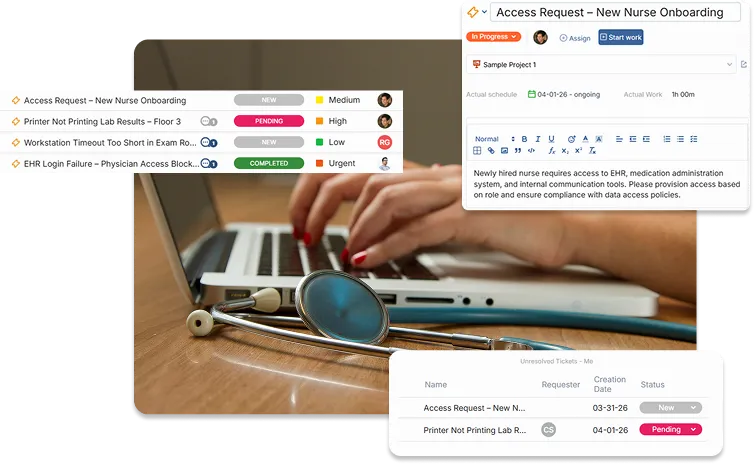
6. OneDesk: The Premier HIPAA-Compliant Helpdesk Solution
Throughout this guide, we have highlighted OneDesk as an ideal solution for a HIPAA-compliant helpdesk. Now, let’s take a deeper dive into the specific features and capabilities that make OneDesk the premier choice for healthcare organizations.
A Deep Dive into OneDesk's Security Features
OneDesk is built on a foundation of robust security to ensure the confidentiality, integrity, and availability of your data. Key security features include:
- Hosting on AWS: OneDesk is hosted on Amazon Web Services (AWS), a leading cloud platform known for its high level of security and HIPAA compliance.
- Data Encryption: All data is encrypted over SSL in transit.
Frequent Data Backups: Regular backups ensure that your data is protected against loss. - Activity Audit Controls: A complete audit trail tracks all user activity within the platform.
- User Authentication and Access Controls: Granular user-level permissions allow you to control who can access what information.
- Two-Factor Authentication (2FA): An extra layer of security to protect against unauthorized access.
- On-Premise and Private Cloud Options: For organizations with specific data residency or security requirements, OneDesk offers on-premise and private cloud deployment options.
Customizable Workflows for Healthcare
Healthcare organizations have unique and often complex workflows. OneDesk provides a highly flexible and customizable platform that can be tailored to meet the specific needs of any healthcare team. You can create custom ticket and task types, custom fields to capture specific information, and custom views to organize and filter your work.
Powerful Automations to Streamline Operations
OneDesk’s powerful automation engine allows you to automate a wide range of tasks and processes, freeing up your team to focus on what matters most: patient care. You can create automation rules to:
Automatically assign tickets to the appropriate team or individual based on the type of request.
Send automated email notifications to patients and staff to keep them informed of the status of their requests.
Update the status of tickets and tasks based on predefined triggers.
Create new tasks or projects automatically based on incoming tickets.
Integrated Project Management for Holistic Healthcare Management
A unique and powerful advantage of OneDesk is its seamless integration of helpdesk and project management functionalities. This allows healthcare organizations to manage both their day-to-day support activities and their larger projects within a single, unified platform. For example, a hospital’s IT department can use OneDesk to manage helpdesk tickets for their EHR system while also using the project management features to plan and execute an upgrade to that same system. This integrated approach provides a holistic view of all work and eliminates the need for multiple, disconnected software tools.
7. Use Cases: OneDesk in Action Across Healthcare
The versatility of OneDesk makes it a valuable tool for a wide range of use cases within the healthcare industry.
Automating Patient Onboarding and Inquiries
A new patient’s first interaction with a healthcare provider is often through an inquiry or a request to schedule an appointment. OneDesk can be used to create a streamlined and automated onboarding process. A custom web form on the provider’s website can capture all the necessary information from new patients. An automation rule can then create a new patient record in OneDesk, send a welcome email with a link to the patient portal, and create a task for a staff member to follow up with the patient to schedule their first appointment.
Managing IT Support for Clinical Systems
Healthcare organizations rely on a complex ecosystem of clinical and administrative software systems. OneDesk can serve as the central hub for all IT support requests related to these systems. When a user experiences an issue with the EHR, they can submit a ticket through the OneDesk portal. Automation rules can then route the ticket to the appropriate IT support specialist based on the system and the urgency of the issue. The integrated knowledge base can also provide users with self-help articles to resolve common issues on their own.
Streamlining Medical Billing and Claims Resolution
As discussed earlier, medical billing companies can leverage OneDesk’s powerful workflow management capabilities to streamline their operations. A custom workflow can be created to manage the entire lifecycle of a claim, from submission to payment. Different statuses can be used to track the progress of each claim, and automation rules can be used to trigger follow-up actions for denied or rejected claims. The platform’s reporting features can provide valuable insights into claim denial rates and other key billing metrics.
Coordinating Care Across Departments
In a large healthcare organization, effective care coordination between different departments is essential. OneDesk can be used to facilitate this communication and collaboration. For example, when a primary care physician refers a patient to a specialist, a task can be created in OneDesk to track the referral. The task can include all the relevant patient information and can be assigned to a care coordinator who is responsible for ensuring that the patient gets an appointment with the specialist in a timely manner. All communication between the primary care physician, the specialist, and the care coordinator can be logged within the task, providing a complete record of the referral process.
8. Customer Stories: Real-World Success with OneDesk
The true measure of a helpdesk solution’s effectiveness is its impact on real-world healthcare organizations. The following customer story illustrates how OneDesk has helped a health clinic improve its operations and enhance patient care.
Cingulum Health: Enhancing Patient Management in a Mental Health Clinic
Cingulum Health, a clinic specializing in a personalized and targeted approach to a range of neurological disorders, places a strong emphasis on the patient experience. They needed a software solution that would enhance their ability to deliver high-quality care while maintaining the security and integrity of their patients’ health information. Their previous system, Trello, lacked the necessary customization options and, most importantly, was not HIPAA compliant.
After implementing OneDesk, Cingulum Health saw significant improvements in their workflow efficiency and patient management. The practice manager noted that “OneDesk’s customisable Kanban-style boards have provided us with a clear, organized view of our entire clinic operations, allowing us to track each patient’s progress from initial enquiry through to post-treatment seamlessly.”
The clinic also leveraged OneDesk’s automation engine to manage administrative tasks, such as assigning the prescribing doctor based on the patient’s status. This has streamlined their processes and reduced the administrative burden on their staff. The secure and HIPAA-compliant environment provided by OneDesk has given the Cingulum Health team peace of mind regarding the safety of their patients’ health information.
9. Comparing HIPAA-Compliant Helpdesk Solutions
While OneDesk stands out as a premier solution, it is important to be aware of the other options available in the market. The following chart provides a high-level comparison of OneDesk with five other popular helpdesk software providers that offer HIPAA-compliant solutions.
As the comparison chart illustrates, OneDesk offers a unique and compelling value proposition for healthcare organizations. Its integrated helpdesk and project management capabilities, combined with its affordable and transparent pricing for a HIPAA-compliant plan, make it an exceptional choice for organizations of all sizes.
| Feature | OneDesk | Zendesk | Freshdesk | Jira Service Management | SolarWinds Service Desk |
| HIPAA Compliance | Yes, with a signed BAA | Yes, with specific plans and add-ons | Yes, with the Enterprise plan and a BAA | Can be configured for HIPAA compliance | Yes, with a signed BAA |
| Integrated Project Management | Yes | No | >No | Yes (strong focus on IT projects) | No |
| Pros | All-in-one helpdesk and project management, highly customizable, strong automation, excellent value | Robust feature set, extensive integrations, large user community | User-friendly interface, good for small to medium-sized businesses | Powerful for IT and development teams, highly customizable workflows | Strong IT asset management capabilities |
| Cons | Can have a learning curve for advanced features | Can be expensive, especially with add-ons for HIPAA compliance, complex pricing | HIPAA compliance only available on the highest-tier plan | Can be complex to set up and manage, less focused on general customer service | More focused on IT service management than general patient support |
| Pricing for HIPAA-Compliant Plan | Starts at $27.99 per user/month (billed annually) for the HIPAA-enabled plan | Requires Suite Professional ($115/agent/month) or higher, plus potentially an Advanced Compliance add-on | Requires the Enterprise plan (contact for pricing) | Contact for enterprise pricing | Contact for pricing |
11. Glossary of HIPAA and Helpdesk Terminology
- Access Controls: The policies and procedures that control who can access and modify computer resources, such as data files.
- Administrative Safeguards: Administrative actions, and policies and procedures, to manage the selection, development, implementation, and maintenance of security measures to protect ePHI.
- Audit Trail: A record of the sequence of events that have occurred on a computer system.
- Business Associate (BA): A person or entity that performs certain functions or activities that involve the use or disclosure of protected health information on behalf of, or provides services to, a covered entity.
- Business Associate Agreement (BAA): A written contract between a covered entity and a business associate that is required by HIPAA.
- Covered Entity: A health plan, a health care clearinghouse, or a health care provider who transmits any health information in electronic form in connection with a transaction covered by HIPAA.
- Electronic Protected Health Information (ePHI): Any protected health information that is created, stored, transmitted, or received in any electronic format.
- Encryption: The process of converting electronic data into a secret code that can only be read by authorized individuals.
- First Contact Resolution (FCR): A key performance indicator that measures the percentage of helpdesk tickets that are resolved on the first interaction.
- Health Insurance Portability and Accountability Act (HIPAA): A U.S. federal law that sets national standards for the protection of sensitive patient health information.
- Helpdesk: A centralized resource that provides information and support to users of a company’s products or services.
- Key Performance Indicator (KPI): A measurable value that demonstrates how effectively a company is achieving key business objectives.
- Knowledge Base: A centralized repository of information, such as articles, FAQs, and tutorials.
- Minimum Necessary Standard: A key provision of the HIPAA Privacy Rule that requires covered entities to take reasonable steps to limit the use or disclosure of, and requests for, protected health information to the minimum necessary to accomplish the intended purpose.
- Omnichannel Support: A customer service strategy that provides a seamless and consistent experience across multiple communication channels.
- Physical Safeguards: Physical measures, policies, and procedures to protect a covered entity’s electronic information systems and related buildings and equipment from natural and environmental hazards, and unauthorized intrusion.
- Privacy Rule: A HIPAA rule that establishes national standards to protect individuals’ medical records and other personal health information.
- Protected Health Information (PHI): Individually identifiable health information that is transmitted or maintained in any form or medium.
- Security Rule: A HIPAA rule that establishes national standards for the security of electronic protected health information.
- Service Level Agreement (SLA): A contract between a service provider and a customer that defines the level of service expected from the provider.
- Ticket: A record of a customer’s or user’s request for support or assistance.
- Workflow Automation: The use of technology to automate a series of tasks or processes.
FAQ
The single most important thing is that the vendor is willing to sign a Business Associate Agreement (BAA). Without a signed BAA, you cannot use the software to handle PHI in a HIPAA-compliant manner.
Yes. While a reputable vendor like OneDesk will provide you with the tools and guidance to configure your account for HIPAA compliance, it is ultimately your responsibility to ensure that you are using the software in a compliant manner.
It is highly unlikely that a free helpdesk solution will meet the security and compliance requirements of HIPAA. Free solutions typically do not offer the necessary security features, nor will the vendor be willing to sign a BAA. OneDesk on the other hand is an affordable solution for a HIPAA helpdesk.
There is no official "HIPAA certification" for software. Any vendor that claims to be "HIPAA-certified" is making a misleading statement. A vendor can, however, be "HIPAA-compliant," which means that their software and their internal policies and procedures meet the requirements of HIPAA.
A helpdesk with granular access controls allows you to define user roles and permissions so that each user only has access to the specific information they need to do their job. This is a key component of adhering to the "minimum necessary" standard.
Yes, a versatile helpdesk solution like OneDesk can be used to manage both patient-facing support and internal support for your staff, such as IT and HR helpdesks.
Using a non-compliant helpdesk for PHI can result in significant penalties from HHS, including fines that can range from thousands to millions of dollars per violation. It can also lead to a loss of patient trust and damage to your organization's reputation.
OneDesk offers a very competitive and transparent pricing model for its HIPAA-enabled accounts. The HIPAA-enabled plan starts at $27.99 per user per month when billed annually and includes the signed BAA and all the features of the Enterprise plan. This provides exceptional value compared to other solutions that often require expensive high-tier plans and additional add-ons for HIPAA compliance.
More about help desk solutions
Ticket Deflection: Why it Matters and Strategies
Imagine a typical morning for your support lead. A customer, let’s call him John, forgot how to update his billing information. John goes to your ...
Read More →
How to Automatically Convert Gmail Emails into Tickets
If your customer support strategy still involves people logging into one shared Gmail account, you’ve likely experienced a kind of ‘support black hole’. This problem ...
Read More →
Solving Inbox Chaos: How to Auto-Assign IT Emails to a Ticketing System
If you’re managing IT requests through a standard Gmail or Outlook inbox, you already know that many incoming emails are tickets that need to be ...
Read More →
10 Tips for Support Agents to Supercharge Productivity
Support agents need to manage high ticket volumes on top of maintaining high CSAT (Customer Satisfaction) scores. Despite this, customers expect fast support. This is ...
Read More →