Email Ticketing System
Free 14-day trial · No credit card required

Why use an email ticketing system?
Using a shared email inbox for customer support can be difficult to manage. The difficulty grows when you manage multiple support email inboxes. As your team grows and customer requests multiply, tracking and collaborating becomes confusing and inefficient. Here is where an email ticketing system can be advantageous.
An email ticketing system turns every email sent to your support address into a ticket with an owner, a priority and a status, so each request is tracked until it’s resolved instead of sitting in a shared inbox. It’s also called email help desk software, an email ticket system or email-based ticketing. OneDesk connects to Gmail, Microsoft 365 or any mailbox, creates tickets automatically, and lets your team route, automate and answer them from one place, with project tools in the same app.
With a robust email ticketing system, like OneDesk, you get better request management with the ability to triage, prioritize, organize, automate — and more.
Improve support with OneDesk's email help desk system
Bring clarity to your email support
OneDesk has a powerful customer email ticketing system, which allows you to fully manage the email and ticket workflow.
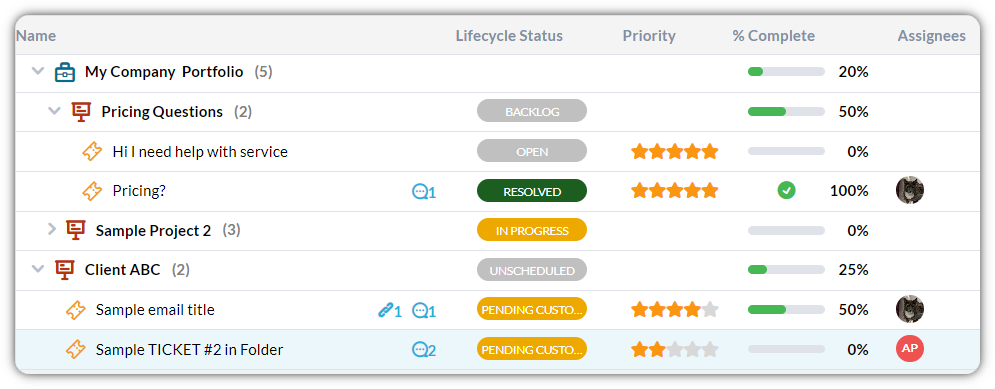
Never lose track of a customer request with powerful organization tools. With just a glance your team has clarity over the status, priority, and owner of the ticket. Your whole support team is on the same page and can work more efficiently.
Connect your support inbox in minutes
OneDesk works with the mailbox you already use. Pick the connection that fits your setup; every option turns incoming emails into tickets automatically.
Option | How it works | Best for |
|---|---|---|
OneDesk connects directly to your Gmail mailbox and pulls in new emails as tickets | Teams on Google Workspace (the recommended method for Gmail) | |
OneDesk connects directly to your Microsoft 365 mailbox | Teams on Outlook and Microsoft 365 | |
Auto-forward from any mailbox | You add a forwarding rule in your email provider that sends support emails to your OneDesk address | Any other provider, or when you can’t connect the mailbox directly |
Replies go back out through OneDesk’s servers, your Microsoft 365 or Gmail account, or your own SMTP server, so customers see your support address in every reply.
Customer email tracking system
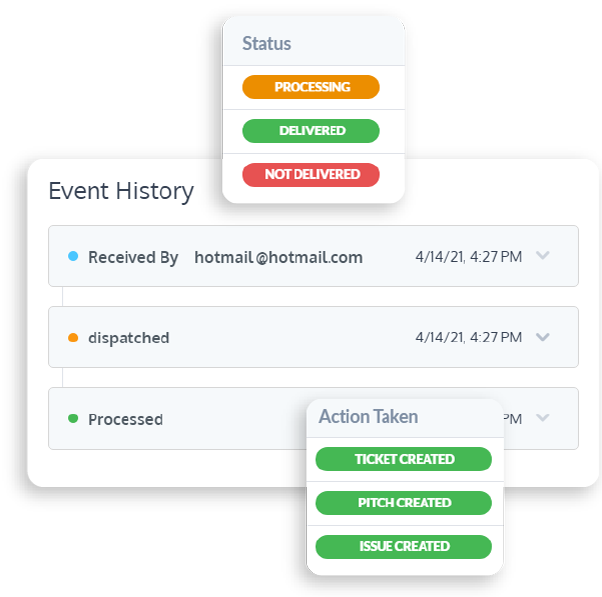
When OneDesk sends an email on your behalf, it doesn’t stop there. You may need to track your customer emails after they are sent or received. OneDesk provides customer email tracking with every plan.
Track which emails you sent and verify if they were delivered correctly. You don’t need to just send and hope. As administrator, you can just open the outgoing email audit panel to see a list of all the emails we send on your behalf. For each email, you can see the delivery status and, for those rare cases where the delivery failed, we will tell you why. Perhaps the email address was incorrect, or the email bounced from the destination server. It doesn’t need to be a mystery as to what happened.
Benefits of OneDesk's email ticketing system:
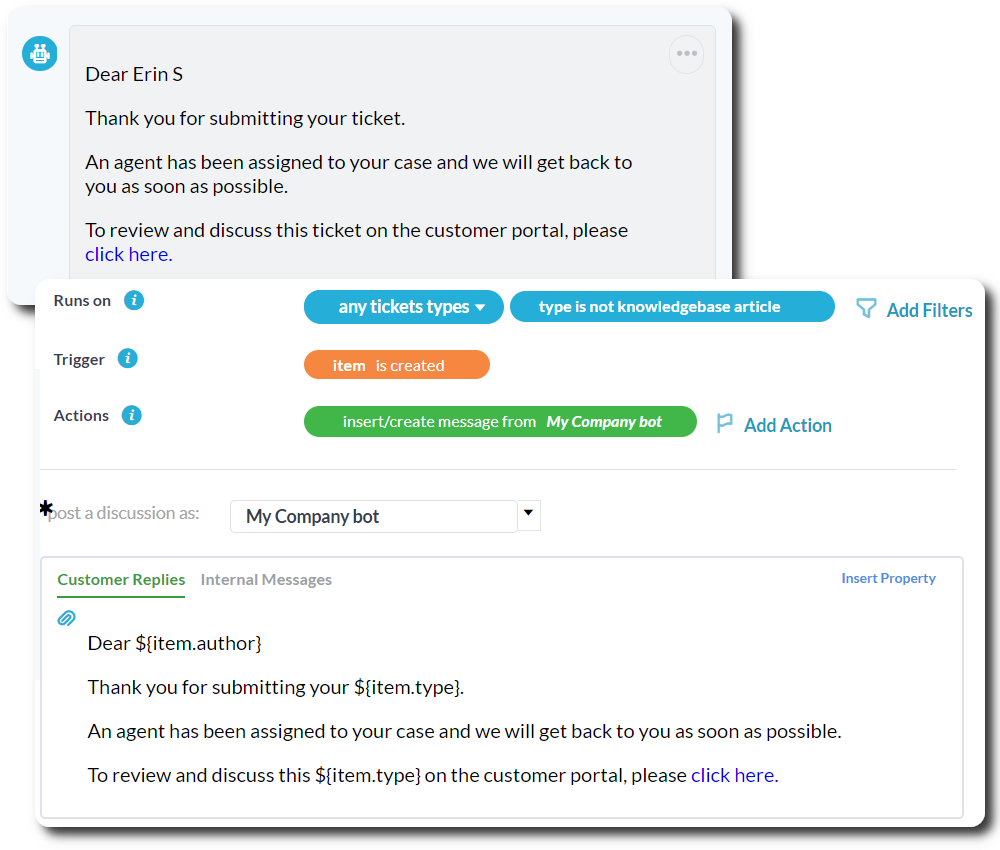
OneDesk’s email ticketing system includes flexible helpdesk automation tools. OneDesk comes equipped with our powerful workflow automation engine.
Automate all aspects of your helpdesk, including replies, assignments, ticket queue triage, status changes, status updates, reminders, notifications, service-level agreements, and a lot more. A large list of triggers, actions, and filters lets you route your tickets in nearly any way you need. This enterprise-level functionality is included in all plans and is one of our most popular features.
Shared inbox vs. email ticketing system
A shared inbox lets your team see the same mailbox. An email ticketing system decides who owns each request and tracks it until it’s solved.
Shared inbox | Email ticketing system (OneDesk) | |
|---|---|---|
Ownership | Whoever replies first, or whoever is tagged | Every ticket is assigned to an agent or team, automatically or by hand |
Priority | Flags, labels or color coding | A priority on every ticket, visible on the agent’s dashboard |
Duplicate replies | Two people can answer the same email | Collision detection shows when someone else is already working on a ticket |
Status | Read, unread or archived | Statuses you define, from new to resolved |
Response targets | Tracked by memory | SLA targets per priority [VERIFY] |
Multiple addresses | Separate inboxes to check | support@, billing@ and other addresses feed one queue, sorted by ticket type |
Reporting | Little or none | Response times, workload and satisfaction reports |
Follow-up work | Forwarded to another tool | Becomes a task or project in the same app |
In-context assistance and collaboration
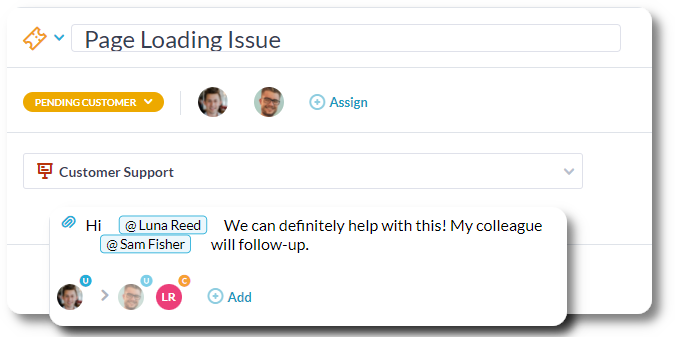
In OneDesk’s email ticketing system you can communicate right next to a ticket’s details. This feature allows everyone to stay in-context and eliminates redundancy. You can respond directly to a customer, loop in your team, or creating a private conversation with a teammate.
Empower your customers with their own tools
In addition to an email ticketing system, OneDesk provides a number of customer-facing tools — live chat, ticket forms, a ticket portal, and a knowledge base. These tools offer customers other ways of receiving support. Regardless of how a customer reaches out, communication is centralized in OneDesk.
Many customer enjoy seeking answers on their own. The portal allows customers to see the status of their inquiries on their own terms. While the knowledgebase can cut down on common questions. Write informative articles for your customers on services, products, or anything else!

Frequently asked questions about email ticketing systems
An email ticketing system centralizes all email (even from multiple inboxes) into one application. The system also allows for a much more streamlined workflow than a traditional inbox. For instance, ticketing systems generally have tools to track and organize tickets. The system can also automatically assign tickets to the right team or individuals, saving time and preventing forgotten requests.
An email ticketing system like OneDesk allows you to integrate your inbox directly or by setting up an auto-forward rule from the inbox. Once integrated, emails will be automatically converted into tickets in the system. All the required information is captured on the ticket-- subject line, body, attachments, and customer details.