- Client Portal Collaboration
One Portal for Every
Client Conversation
OneDesk gives your clients a branded client portal with a live chat, knowledge base, and intake forms. Everything your team needs to collaborate with your clients in one place.
Free 14-day trial · No credit card required
USE CASES
One Platform for Every Way Clients Interact With Your Team
From portal self-service and live chat to multichannel ticketing, approvals, file sharing, and automated reporting — OneDesk handles every touchpoint in the client relationship.
One place for every client to interact with your team
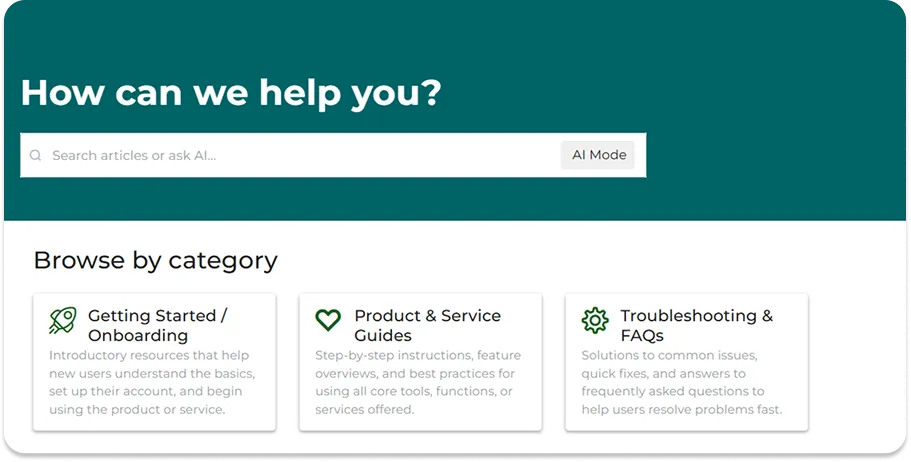
Give every client a dedicated, branded portal where they can submit requests, track tickets and tasks, browse your knowledge base for answers, participate in live chat, download shared files, and message your team. Clients stay informed and your team handles more work.
- Branded portal with tickets, tasks, files, and knowledge base
- Live chat widget for real-time client conversations
- Self-service knowledge base for clients to learn about your services

Every channel your clients use, one place for your team
Clients reach out however they prefer — portal, email, live chat, or web form. Every message becomes a structured conversation in a shared team queue, with full client history, context, and prior interactions visible alongside it. Your team responds from one place. Clients get a consistent, professional experience regardless of the channel they chose.
- Email, portal, live chat, and web form all feeding one shared queue
- Full client communication history visible on every new conversation
- Internal notes on every thread for team coordination clients never see

Give clients visibility into every piece of work
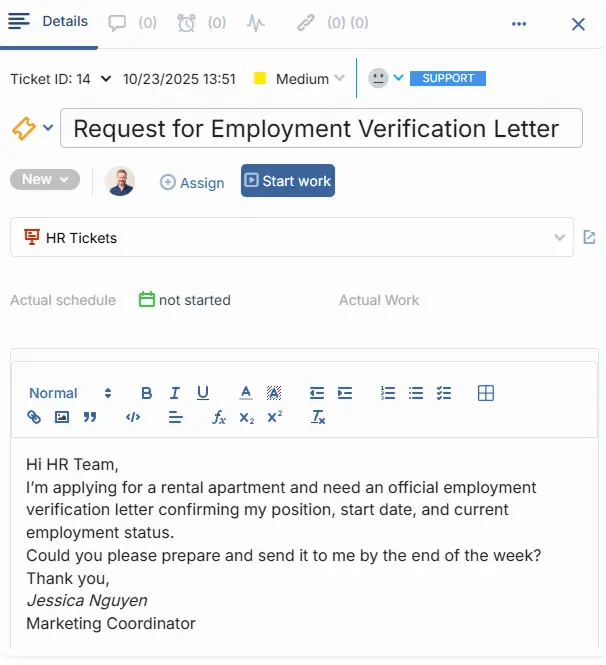
Whether the work is a support ticket, or a project task, clients can track progress, leave comments, and share files through the portal. Your team manages work internally while clients see exactly what is relevant to them — no more chasing for updates, no accidental exposure of internal detail.
- Client-visible tickets and tasks with status, comments, and file attachments
- Approval requests sent directly through the portal with one-click sign-off
- Project milestones and progress visible to clients without exposing internal boards
Show clients exactly what your team has delivered
Share service reports, activity summaries, and interaction histories with clients directly through email. Scheduled reports land in their email automatically — no manual sending required. In the portal, clients can view tickets or tasks, client conversations and shared files in one scrollable timeline.
- Scheduled service reports delivered automatically
- Client interaction history: tickets, messages, files
- Per-client activity summaries ready for service reviews and renewals

FEATURES
Every Feature Your Team Needs to Deliver a Great Client Experience
Client portal, live chat, knowledge base, multichannel ticketing, approvals, file sharing, internal messaging, and automated reports — everything a professional services team needs to keep clients informed and collaborating.
Client Portal
Each client accesses a dedicated portal scoped entirely to their account. The portal reflects your branding. Clients see a professional, curated experience. They never see another client's data, your internal notes, or your team's back-end workspace.
Live Chat
Embed a live chat widget on your website. Clients start a conversation and your team responds in real time from the shared queue. The chat can be converted to a ticket and the conversation can continue via email.
Knowledge Base
Build a searchable knowledge base of articles, guides, and FAQs for your team or clients. Clients can learn about your services through the knowledgebase. Or build an internal KB for your team to document processes.
Messaging
Every ticket, task, and project carries two message threads: a client-facing thread for updates or questions and a private internal thread for your team's notes and coordination. Clients reply by email or through the portal — either way the message lands in the right place.
Approvals
Send approval requests to clients directly from a ticket or task. Clients review directly from email, leave a comment if needed, and approve or request changes with one click. Approvals are timestamped and logged against the work item.
Reports
Generate and share client-ready reports — activity summaries, ticket histories, completed work, response times, and upcoming items — automatically through email on a schedule you set. Clients see a transparent, professional view of everything your team has done.
FAQ
Common Questions
Your clients can submit tickets or send messages via the included live chat, portal, or web forms. You can also connect your email, phone number, or integrated apps.
The live chat is can be embedded onto your website using a simple snippet or integration. This allows your clients to easily message you. Chats come right into your OneDesk messenger.
Launch Your Client Portal in a Day
Set up your portal and get started with a free 14 day trial.