- Client Project Delivery
From First Request to Final Invoice,
All in One Place
OneDesk gives client services teams one platform to intake project requests, send quotes, plan and deliver work, collaborate with clients, track time, and invoice. All without switching between a dozen separate tools.
Free 14-day trial · No credit card required
USE CASES
For Every Stage of Client Project Delivery
From intake and quoting to delivery, client collaboration, and invoicing — OneDesk handles the full project lifecycle for professional services teams.
Turn enquiries into scoped, approved projects
Capture new project requests through a branded intake form — collecting scope, budget, timeline, and any supporting documents from the client upfront. Build and send a quote directly from the request, get client approval with a single click, and convert the approved quote into a live project automatically. No separate tools, no lost context.
- Branded intake forms that capture everything you need before scoping begins
- Quote builder with line items, flat fees, hourly rates, and optional extras
- One-click client approval that converts the quote into a project instantly

Plan every engagement from kickoff to close
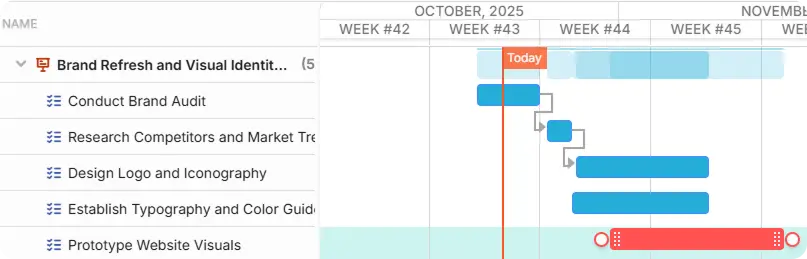
Once a project is live, give your team a structured workspace to plan phases, set milestones, assign tasks and subtasks, and map dependencies. Track delivery on a Gantt timeline or a Kanban board. Share a client-facing view of progress through the portal without exposing your internal task detail or team notes.
- Gantt timelines with milestones, task dependencies, and phase-based planning
- Kanban boards for managing day-to-day delivery work visually
- Client-facing project progress view separate from your internal workspace
Keep every client conversation in one place
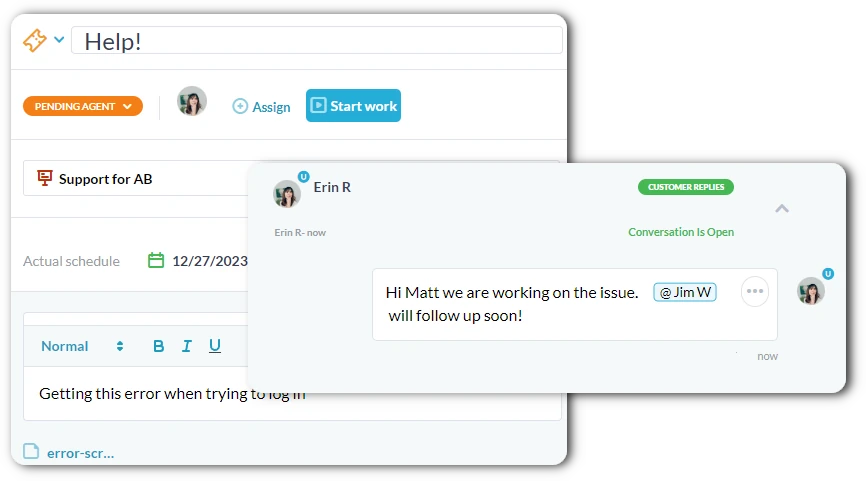
Every project has two message layers: a client-facing thread for updates, questions, file sharing, and approvals, and a private internal thread for your team’s notes and coordination. Clients communicate through the portal or by replying to email — either way, the message lands in the right thread. Nothing gets lost between inboxes.
- Client and internal message threads kept separate on every project
- Email integration so clients can reply by email and it lands in the portal
- File sharing and approval requests sent directly through the client thread
Bill accurately for every engagement type
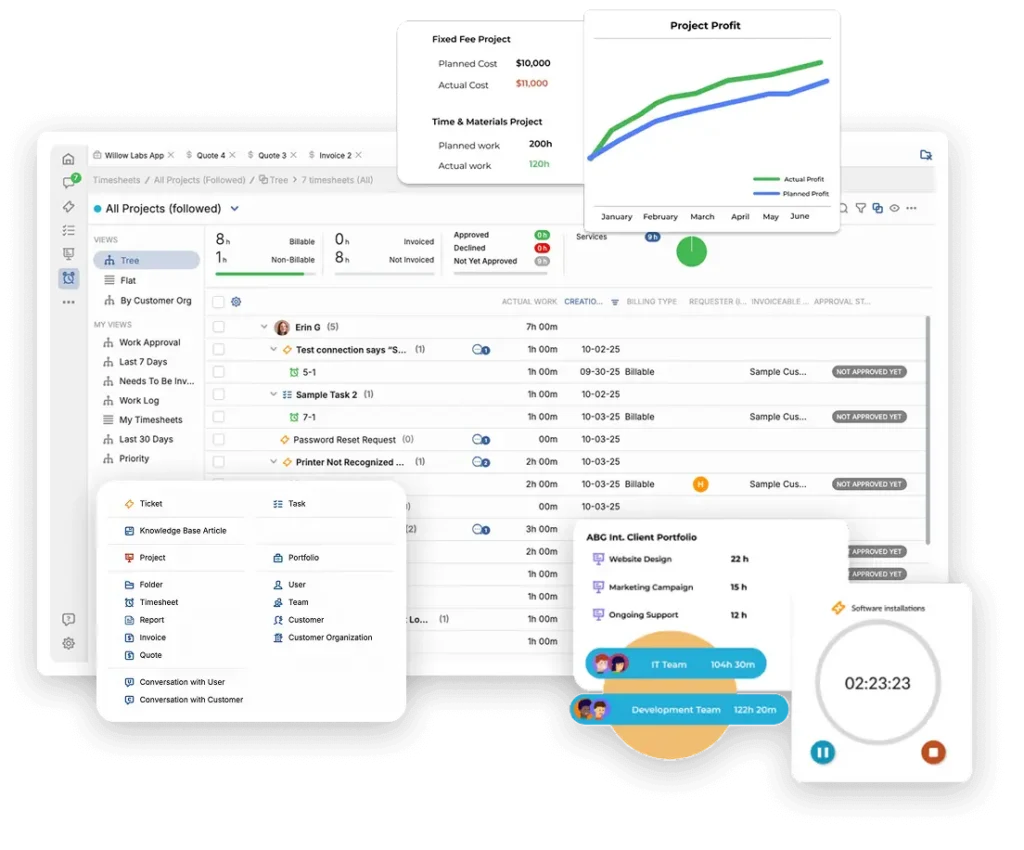
Log time directly on project tasks as work happens. Track expenses with receipts. Whether you charge a flat project fee, bill hourly, or use a hybrid model, OneDesk captures all work against the right billing arrangement and generates an itemised invoice from real data — not week-end estimates or spreadsheet guesswork.
- Time logging on tasks and tickets with billable or non-billable flags
- Flat fee, hourly, and expense billing supported per project or per task
- Invoice generation from logged work with client-ready line item breakdown

FEATURES
Everything a Professional Services Team Needs to Deliver and Get Paid
Client portal, intake forms, quoting, Gantt and Kanban project management, subtasks, time tracking, billing, client and internal messaging, and approvals — everything teams needs to deliver great work and get paid for it.
Client Portal
Give each client their own branded portal where they can submit project requests, track delivery progress, and message your team. Every interaction is logged and tied to the project it belongs to.
Intake & Quoting
Clients can submit project requests through a structured intake form, giving your team the scope, budget, and context needed before a conversation even starts. Build a quote with line items, flat fees, and hourly rates. Send it to the client and they approve it in one click.
Project Planning
Plan every project on an interactive Gantt with phase milestones, task dependencies, and start-to-finish scheduling. Switch to Kanban for daily delivery work. Break complex deliverables into subtasks with individual owners and due dates.
Messaging
Create different conversations. Client-facing thread for updates, questions, approvals, and file sharing, and a private internal thread for your team's coordination and notes. Clients reply by email or through the portal and either way the message lands in the right thread.
Time & Billing
Team members log time directly on project tasks as they work. Expenses are recorded with receipts and linked to the right project. Flat-fee and time billing models are all supported. At invoice time, generate an itemized bill from actual work data and send it to the client via email.
Automation
Notify team members when their tasks open, move work to the next stage when dependencies complete, send clients automatic progress updates at key milestones, and escalate overdue deliverables before they become a client conversation — all without manual work.
FAQ
Common Questions
Yes. Email integration means clients can reply to messages by email and their reply lands in the correct conversation in OneDesk. Your team responds from OneDesk and the client receives the reply by email. Both sides of the conversation are in the right place regardless of which channel the client uses.
Yes, you can create approvals and add a client. The client receives notification via email and can approve or decline and add comments directly.
Clients submit a project request through a branded intake form, which is on your portal or embedded on your website. The form collects scope and any supporting files. Your team reviews the request and builds a quote with line items, flat fees, hourly rates, and optional extras. The quote is sent to the client through email, they review and approve it in one click.
Give Your Team One Platform for the Entire Project Lifecycle
One platform where your enquiries, quotes, projects, client conversations, and invoices all live together.