- IT Service Management
Never Miss a Deadline.
Exceed Every Expectation.
OneDesk gives your support team the visibility and automation needed to hit every service target, every time. Stop reacting to breaches and start preventing them with intelligent timers, automated escalations, and real-time compliance dashboards. Turn your Service Level Agreements into a competitive advantage.
Free 14-day trial · No credit card required
USE CASES
Proactive Service Standards, Powered by Automation
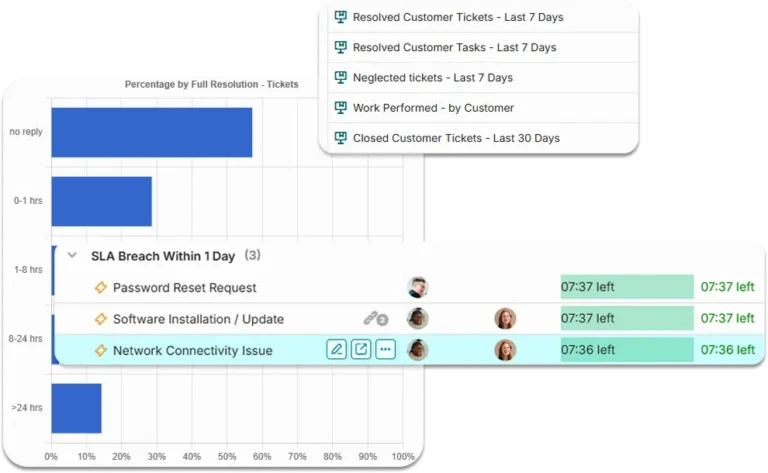
OneDesk bridges the gap between your service promises and your team’s execution, ensuring every ticket is handled with the appropriate urgency.
Smart Policies for Complex Service Needs
One-size-fits-all SLAs don’t work for modern support. OneDesk allows you to define sophisticated policies that trigger based on ticket type, priority, or specific client contracts. Whether it’s a P1 critical bug for a VIP account or a standard query, the right clock always starts at the right time.
- Automatically apply tighter deadlines for high-impact issues.
- Honor custom contractual obligations for your most important accounts.
- Apply different rules for "Technical Support" vs. "Billing Inquiries" automatically.

Stop Breaches Before They Happen
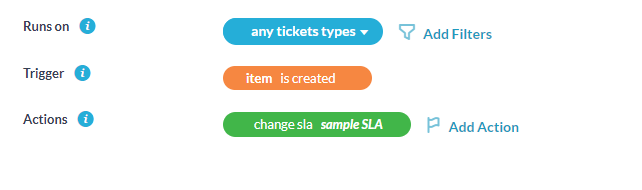
Shift from reactive firefighting to proactive management. OneDesk’s automation engine monitors your SLAs in real-time, triggering notifications, reassigning tickets to senior leads, or escalating priority levels before a breach occurs. Keep your team ahead of the clock without manual monitoring.
- Notify agents and managers when a ticket reaches 75% of its SLA limit.
- Move at-risk tickets to available senior agents or specialized squads instantly.
- Automatically bump priority levels or notify stakeholders as deadlines approach.
Your Service Health, Visible in Every View
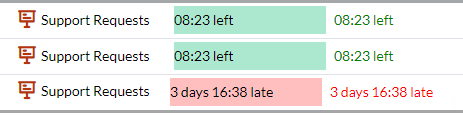
Don’t hide your deadlines in a deep report. OneDesk brings SLA status front-and-center in your daily workflow. View upcoming breaches directly in your ticket lists, Kanban boards, and personalized user dashboards, so every agent knows exactly what to work on next.
- Visual clocks on every ticket showing exactly how much time remains.
- Color-coded indicators flag tickets nearing breach in all views and search results.
- Every team member sees their specific SLA performance and urgent tasks at a glance.
Data-Driven Insights for Continuous Improvement
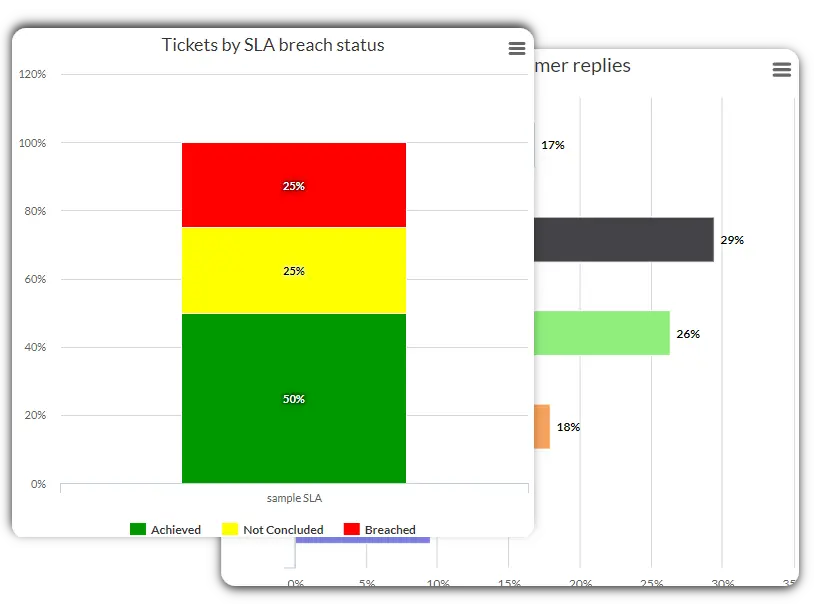
Turn your performance data into a roadmap for growth. Run detailed reports and charts on First Response Time (FRT) and Resolution Time. Identify bottlenecks in your support lifecycle and use historical trends to optimize your team’s capacity and service standards.
- Track exactly how long it takes to acknowledge and close every ticket.
- View the percentage of met vs. breached targets per agent, team, or client.
- Identify peak times or specific issue types that frequently cause service delays.
FEATURES
Built for High-Standard Service Organizations
Standardize your response times, automate your triage, and provide a transparent, high-performance support experience.
FAQ
Frequently Asked Questions
Yes. OneDesk allows you to define your company's work schedule and apply SLAs that only "tick" during business hours. You can also exclude weekends and public holidays to ensure your performance metrics are fair and accurate.
You can configure OneDesk to send internal notifications (via email or in-app alerts) at specific intervals—for example, when 50%, 75%, or 90% of the SLA time has elapsed. These alerts can be sent to the assigned agent, their manager, or a specific support channel.
Absolutely. OneDesk’s reporting engine allows you to filter SLA compliance data by client, project, or portfolio. This is perfect for quarterly business reviews (QBRs) where you need to prove you are meeting your contractual obligations.
Start Tracking SLAs
Start connecting your ticket channels and defining your SLA policies.