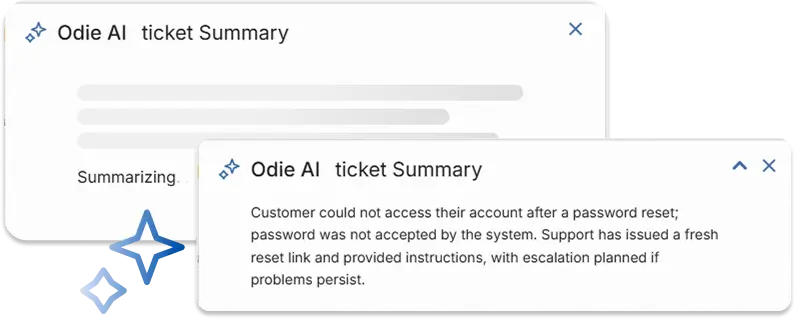
Summarize tickets, tasks, and projects
With Odie AI your team can summarize tickets, tasks, or projects. The AI summaries feature analyzes the work item’s details, conversations, and important updates to create a concise yet comprehensive summary.
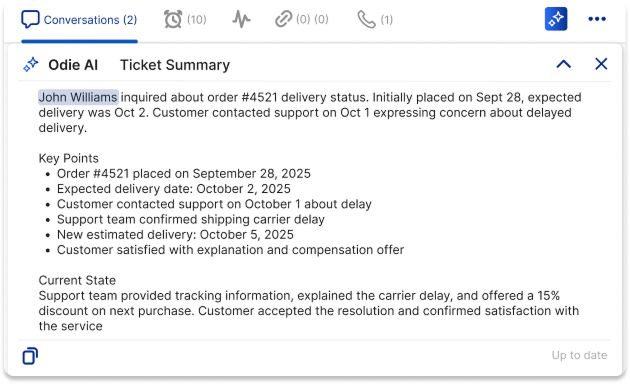
Less scrolling, more action
Cut through the long comment threads to surface the information you need. Summaries save hours a week so you can spend less time getting context and more time resolving work.
Get clarity in seconds
Tagged in a long thread or returning to a stale backlog? Get up to speed instantly with smart recaps that explain exactly why you were mentioned and the current state of things.
Speed up management
Speed up manual assignments and resource allocation. Get a summary of the ticket or task so you know who the right assignee should be.
AI summaries to make work a breeze
OneDesk AI summaries are built to enhance your workflows
Help Desk
Summarize tickets from your connected communication channels (email, chat, form, etc.) so you can resolve issues faster.
Project Management
Clear out your to-do list and backlog by summarizing key details of tasks.
Work Management
Speed up your project delivery by catching up on key project details with AI summaries.
FAQ
AI Summaries are a feature of help desk and work management tools. Using modern AI technology, summaries take the key information on tickets, tasks, or projects and generate a concise yet specific summary of information. Odie AI (OneDesk's AI) uses key updates like status changes, conversations, and descriptions to build the summary, so the most important information is included.
AI summaries can be used at many points in your help desk workflow:
- When you are assigned to, or tagged in a ticket. Summaries allow you to get up to speed and start working on the ticket faster.
- As a manager, if you need to manually assign a ticket, you can quickly get the key details in order to assign it to the right agent. This reduces the delay between submission and assignment.
- When reviewing archived tickets, summaries can help you spend less time reviewing what was done. This is particularly helpful if you want to create an article from the resolved ticket or otherwise use it as reference for a current ticket.
Typically your team will spend a long time reading through long conversation threads in order to get context or customer sentiment. AI summaries reduces the time spent on this process, so your team can get right to working on the ticket or task.
If you are new to OneDesk you can sign up for a free trial by clicking the 'Sign up' button. The trial includes the Enterprise features including credits to try out the AI Summaries.
More AI workflows
10 Tips for Support Agents to Supercharge Productivity
Support agents need to manage high ticket volumes on top of maintaining high CSAT (Customer Satisfaction) scores. Despite this, customers expect fast support. This is ...
Read More →
Effortless Knowledge Creation: AI-Powered Article Generation
Your team’s knowledge is a valuable asset. In OneDesk, your knowledge base provides a self-service hub for your customers (or agents!) to find solutions. Every ...
Read More →
Resolve Tickets in Record Time with AI Summaries
In the world of customer support, time is a critical resource. Every moment an agent spends reading through conversations threads and ticket history is a ...
Read More →
Use AI to Improve Customer Support
Generative AI tools such as ChatGPT, have been a popular topic lately. Many businesses and clients are experimenting and exploring the use cases of AI ...
Read More →