What’s New in OneDesk
The latest release of OneDesk is now live! This release brings some big new features as well as some frequently requested enhancements.
Asset Management
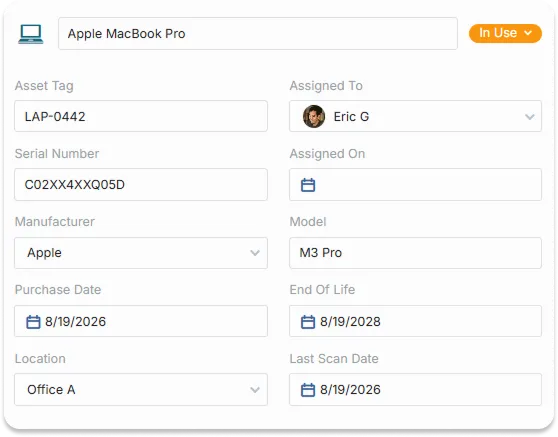
If you need to track assets in your company you probably use a spreadsheet or maybe a separate paid app. With this release, OneDesk introduces a basic Asset Management app to make this job easier. We have knowledgebase articles (released and upcoming) which will dive into various aspects of asset management.
Here are the main features:
- Create records for each of the assets you wish to track, These assets can represent hardware, software, equipment, or anything else your company owns and manages.
- Organize these assets into hierarchical types. Easily search, sort, group and create views for all your assets.
- Add as many custom properties as you need to the various asset types. A simple example:
- Type ‘Hardware’, with custom field ‘Purchase date’
- Sub-type ‘Laptop’, with custom fields ‘OS’, ‘Screen size’ inside the Hardware type.
- Create an asset for Jill’s laptop and you can enter: ‘Purchase date: Jul 1, 2026’, ‘OS: Windows’, ‘Screen size: 15in’
- Take assets through a lifecycle, tracking newly purchased, assigned, and retired assets with ease. Create the statuses and workflows that work for your company.
- Allow users to open tickets directly on a specific asset. Now when someone breaks their laptop screen or loses their mobile device, you will know exactly the asset impacted.
Approvals
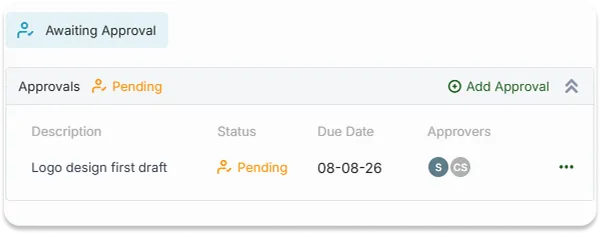
With this release we have introduced “Approvals”. This feature allows users to request an approval before moving forward with a task or ticket.
The new approvals feature includes the following capabilities.
- Create an approval. -> Identify the approver, the approve-by date, and include any comments and attachments.
- Approvers are notified and can approve or decline the approval, and add their comments
- Optional ‘validation rules’ can be created (by admins) to ensure that approvals are approved before the task can move forward
- Advanced approval logic: Multi-step approvals, any/all logic for multiple approvers, team approval and more.
Real-time Translation on Live Chat (beta)
With OneDesk you can now serve customers in any language. Turn on live translation and OneDesk will automatically translate incoming chats into your organization’s language. You can reply in your own language and the customer/end-user will see your messages in their own language. It’s like a babelfish built right into OneDesk.
- Automatically detect the language of incoming messages.
- Automatically translate incoming messages into your own language if it differs from your own.
- Automatically translate your outgoing messages to the target language for the end-user.
- See the original message if you want.
Archiving in Place
We have improved archiving. Now when you archive tickets or tasks they remain in the original project rather than moving to the archival projects. This makes it easier when trying to find an archived item.
Project Enhancements
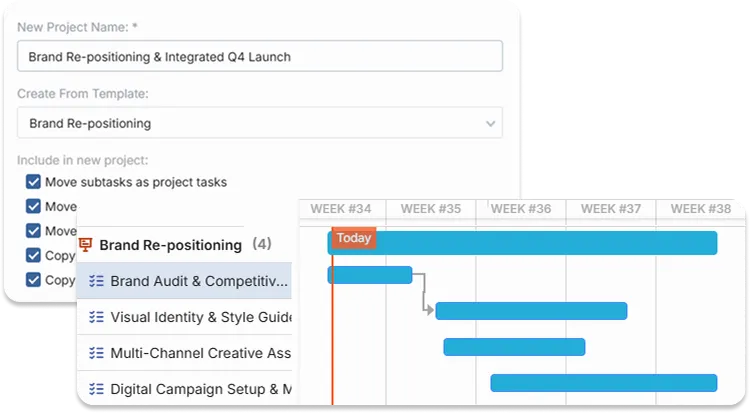
.Create projects from tickets: Now if you get a ticket that you wish to convert to a project you can do that easily. Requesters, followers, descriptions and more are preserved. You can even choose to populate that project automatically from a project template.
Webforms for projects: Now you can create and publish webforms for your customers and end-users to request projects of all types. Add all the properties you want to the form and ask you customer to fill it out. You can even decide to automatically populate the project from a selected template or even ask the customer to select the request type and use a different template based on their response.
Validation rules on Projects: Validation rules allow admins to specify the conditions that must be met before making changes to projects. For example, require that all tasks be completed before the project can be marked as finished.
SLA by the 5 Minutes
Now users can create Service Level Agreements (SLA’s) that have even shorter breach times and requirements. Did you promise to reply to the customer within 10 minutes of getting a ticket? Do you want to decrease the response time for your team? Now you can set SLA policies for any breach criteria with as low a value as 5 minutes. Offer even faster service and tighter SLA guarantees with OneDesk.
Other Enhancements
Grid editing Styling → Improved look for when you edit properties directly in the data grid.
Color-Coding of Gantt → Make the Gantt more informative by color coding the bars based on status, assignee, type, and much more.
Turn off reactions → Admins now have the option to disable reactions.
KB Article view count → Optionally turn on the count of views of your KB articles, to evaluate how popular they are.
Power BI Integration → OneDesk now provides a .MEZ file to easily allow you to connect your Power BI to the OneDesk API
Reimport customer records to update → Now if you want to update your customer records with new or additional data (like adding a phone number), you can re-import your CSV with additional information. This will add data to existing records or overwrite selected existing properties.
Status Transitions → If you would like to manage the status changes that a user makes when they update a task, we have added some controls for this. Note that this is intended to reduce unintentional errors rather than enforce strict rules. There are still ways that a ticket could have its status changed by Automation, API, Macros, and other methods.
Many other bug fixes and enhancements.
Check our knowledgebase for details on how to use new features.