Table of Contents
Best Time Tracking and Invoicing Software for Client Projects and Support 2026
Anyone who works on client projects and support knows the importance of accurately tracking billable hours. Billable hours and the subsequent sending of invoices is the foundation of a profitable services business. This guide is an exploration of the best software solutions designed to refine these processes. By using these tools, businesses can unlock higher efficiency and grow more robust, trust-based client relationships.
Summary
This guide looks at time tracking and invoicing software, pinpointing the best solutions for businesses that manage both client projects and client support. We will point out the essential features, benefits, and implementation process of these platforms. We’ve provided a ranked list of the best software options, with each solution subjected to a review of key functionalities, advantages, disadvantages, and pricing structures. Whether you are a growing consultancy or a large-scale enterprise, this guide will provide you with the knowledge needed to select the ideal software.
Top Choice: OneDesk
Following side-by-side comparison, OneDesk emerges as the leader in time tracking and invoicing software for client projects and support. Its unified platform integrates project management, helpdesk, and financial tools, delivering a solution that perfectly addresses the complex, multifaceted needs of service-based businesses. OneDesk’s robust feature set, paired with an intuitive user interface and exceptional customer support, solidifies its position as the optimal choice for organizations wanting to improve their workflows, productivity, and profitability.
About Solutions for Tracking and Invoicing for Client Times, Projects, and Support
Time tracking and invoicing software are a specialized segment of business management tools designed to assist companies in recording time spent on tasks and projects. This captured time is then used to generate professional, accurate invoices for their clients. This category of software automates and streamlines the entire workflow, from the initial capture of billable hours to the final dispatch of invoices and the tracking of payments.
At its core, this software provides a central hub for logging work hours against designated clients, projects, and individual tasks. This is achievable through multiple methods, including manual time entry and integrated timers. The aggregated time data is then compiled into detailed timesheets, which can be systematically reviewed and approved by management.
The invoicing module of the software uses this time data to automatically create invoices. Typically, users can customize invoice templates to align with their brand, establish variable billing rates for different clients or specific tasks, and include detailed, itemized breakdowns of the work.
Beyond the fundamental capabilities of time tracking and invoicing, many modern solutions have evolved into comprehensive Professional Services Automation (PSA) platforms. These tools often encompass features for project planning and scheduling, task management, resource allocation, expense tracking, and powerful reporting and analytics. By combining these functionalities into a single, unified system, businesses can attain a full view of their projects, monitor profitability, and make informed, data-driven decisions.
Benefits of Solutions for Tracking and Invoicing for Time for Client Projects and Support
Adopting a time tracking and invoicing software solution provides many benefits that can affect operational efficiency, financial health, and client relations.
- Improved Accuracy in Billing: By automating the time tracking process, businesses can reduce the human errors of manual data entry. This ensures every billable minute is captured and invoiced properly, preventing revenue leakage and fostering client trust through transparent and accurate billing practices.
- Enhanced Profitability: Accurate time tracking provides a clear understanding of the time and resources invested in each project. This enables businesses to conduct detailed project profitability analyses, identify operational inefficiencies, and make informed strategic decisions regarding resources to maximize their bottom line.
- Streamlined Workflows and Increased Efficiency: Automating the time tracking and invoicing lifecycle frees up valuable employee time, allowing them to focus on revenue-generating activities rather than administrative tasks. The seamless integration of these functions within a single platform eliminates the need for multiple, disconnected tools, further optimizing workflows.
- Improved Project Management and Visibility: Some time tracking and invoicing solutions are equipped with integrated project management features, offering a centralized place for planning, executing, and monitoring projects. This provides managers with real-time visibility into project progress, team workloads, and budgets, empowering them to proactively address potential problems and ensure projects remain on schedule and within scope.
- Faster Payments and Improved Cash Flow: Automated invoicing and payment reminders help to accelerate the payment cycle, contributing to a more consistent and predictable cash flow. Many solutions also integrate with online payment tools, simplifying the payment process for clients.
- Data-Driven Decision Making: The wealth of data collected by time tracking and invoicing software offers invaluable insights into numerous facets of the business. Detailed reports on time utilization, project profitability, and employee performance empower management to make strategic, data-backed decisions that fuel growth and enhance operational efficiency.
- Enhanced Client Relationships: The combination accurate invoicing and efficient project management cultivates greater client satisfaction and trust. When clients get a clear and detailed understanding of the work being performed and are billed accurately for it, it creates strong, enduring partnerships.
How to Implement Solutions for Tracking and Invoicing for Time for Client Projects and Support
The following steps outline a clear path to ensure a seamless transition and maximize the return on your software investment:
1. Define Your Objectives: Before embarking on the software selection process, it is crucial to clearly articulate your desired outcomes. Are you aiming to achieve more transparent hourly billing, enhance productivity tracking, improve project management, or a combination of these? Establishing clear, measurable goals will serve as a compass for your selection process and a benchmark for gauging the success of the implementation.
2. Choose the Right Tool: With your objectives firmly in place, you can start the evaluation of different software solutions. Take into account the specific requirements of your business, including team size, project complexity, and budgetary constraints. Seek a solution that offers the required features without being overly complex, which could hinder user adoption.
3. Develop a Clear Time Tracking Policy: Create an unambiguous set of guidelines for how and when your team should track their time. This policy should explicitly define what constitutes billable versus non-billable activities, the level of detail required for time entries, and the formal process for submitting and approving timesheets.
4. Configure the Software to Your Needs: Upon selecting a tool, invest the necessary time to configure it to align perfectly with your established business processes. This may entail setting up user accounts, defining distinct user roles and permissions, creating project templates, and customizing invoice templates to reflect your company’s branding.
5. Provide Comprehensive Training: Ensure that your entire team is proficient in using the new software. Conduct thorough training sessions that cover all key features and functionalities. It is also beneficial to create and disseminate supporting documentation or video tutorials that team members can reference for ongoing support.
6. Start with a Pilot Program: Before a full-scale rollout across the organization, consider initiating a pilot program with a small, representative group of users. This will enable you to identify and resolve any potential issues or challenges in a controlled setting. The feedback gathered from the pilot group can be instrumental in refining your implementation strategy.
7. Communicate the Benefits: To foster enthusiastic adoption, it is vital to effectively communicate the benefits of the new software to your team. Clearly explain how it will simplify their daily tasks, improve overall efficiency, and contribute to the collective success of the business.
8. Monitor and Gather Feedback: Post-implementation, continuously monitor the software’s usage and actively solicit feedback from your team. This will help you pinpoint areas for improvement and ensure the software is consistently meeting your predefined objectives. Regular check-ins and user surveys are effective methods for collecting this valuable feedback.
9. Iterate and Improve: Based on the feedback you receive, be prepared to make iterative adjustments to your processes and the software’s configuration. A successful implementation is not a one-time event but rather an ongoing process of refinement and continuous improvement.
Evaluation Criteria
When choosing a time tracking and invoicing software, it is important to evaluate each potential solution against a set of key criteria to ensure it aligns with the unique needs and workflows of your business.
Here are the most critical factors to consider:
Ease of Use: The software should feature an intuitive interface that allows for effortless time tracking and a straightforward review and invoicing processes. Too steep a learning curve can result in low adoption rates and user frustration.
Time Tracking Capabilities: Look for a solution offering flexible time tracking options, such as manual entry and start-stop timers. The ability to meticulously track time against specific projects, tasks, and client support issues is absolutely essential.
Invoicing and Billing Features: The software must enable the creation of professional and customizable invoices. Key features to look for include the ability to set diverse billing rates and customize the itemized lists.
Client Support Integration: The software should include some ability to receive client communication and support issues. This will allow your team to easily keep up to date with clients and track time on any client requests, feedback, or support.
Project Management Integration: A solution that merges time tracking with robust project management functionalities is advantageous. This integration allows for more effective tracking of project progress, monitoring of budgets, and allocation of resources.
Reporting and Analytics: Powerful reporting and analytics capabilities are crucial for gaining insights into your business operations. The software should provide detailed, customizable reports on time usage, project profitability, employee productivity, and other vital metrics.
Customization: The software should be adaptable to your unique business processes. This includes the ability to create custom fields, workflows, and reports to meet your specific requirements.
Security: Given that you will be handling sensitive client and financial data, it is paramount to select a solution that prioritizes security. Look for features such as robust data encryption, granular user access controls, and compliance with relevant data privacy regulations.
Pricing: The pricing model should be transparent, scalable, and accommodate your business’s growth. Consider the total cost of ownership, including any setup fees, recurring subscription costs, and charges for additional users or premium features.
By evaluating each of these criteria, you can confidently select a time tracking and invoicing software that not only fulfills your current needs but also serves your long-term business objectives.
Here is our ranked list of the best software solutions for tracking and invoicing for time for client projects and support.
1. OneDesk
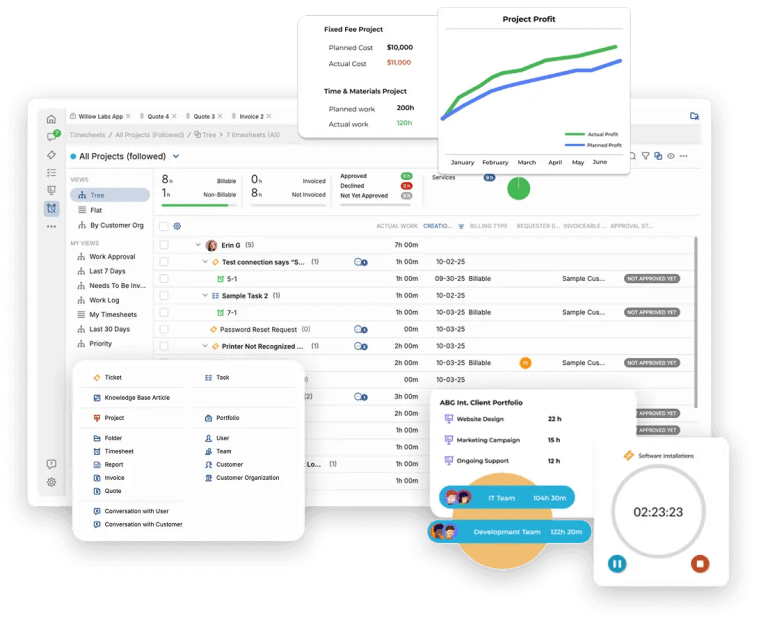
OneDesk distinguishes itself as the top solution through its uniquely integrated, all-in-one platform that combines helpdesk, project management, time tracking and invoicing functionalities. The unified platform eliminates the need for multiple, disparate systems, establishing a single source of truth for all client-related activities and project data.
Why OneDesk is the Optimal Solution
The key strength of OneDesk is its innate ability to seamlessly bridge the gap between customer support and project execution. For businesses that deliver ongoing support concurrently with project-based work, this deep integration is a huge advantage. A customer support ticket can be effortlessly converted into a task within a project, guaranteeing a fluid workflow and complete, end-to-end visibility from the initial client request through to final resolution and invoicing. This powerful capability eliminates the communication silos and data fragmentation that frequently happen for businesses using separate support and project management tools.
Moreover, OneDesk’s comprehensive and robust feature set is meticulously designed to cater to the entire project lifecycle, from initial quote and estimation to execution, time tracking, and final invoicing. The platform’s flexibility empowers businesses to manage both traditional waterfall and agile project methodologies, rendering it highly adaptable to a diverse array of industries and workflows.
Standout Features of OneDesk
- Unified Platform: The core differentiator is the seamless combination of email integration, client support (including, phone, chat, forms, and ticketing), project management, and financial tools within a single, cohesive application. This provides a 360 view of all client interactions and project activities.
- Granular Time Tracking: OneDesk offers powerful time tracking capabilities, allowing users to log time via detailed timesheets or a convenient built-in timer. Time can be designated as billable or non-billable, and users can include detailed notes to each time entry for full transparency.
- Integrated Invoicing: The platform enables the direct creation and dispatch of professional invoices from tracked time entries. It also allows for the generation of quotes and estimates based on project templates.
- Seamless QuickBooks Integration: OneDesk’s integration with QuickBooks Online streamlines accounting processes by eliminating redundant data entry. Invoices can be copied to your QuickBooks account with a single click.
- Customer-Facing Applications: OneDesk provides a suite of client-facing tools, including a dedicated client portal, a comprehensive knowledge base, and integrated live chat, to significantly enhance communication and provide valuable self-service options.
- Powerful Automation Engine: OneDesk’s sophisticated automation features allow you to streamline a wide range of repetitive tasks, such as ticket routing, status-based notifications, and timesheet approvals, freeing up valuable team resources.
- Full-Featured Mobile App: The OneDesk mobile application for both iOS and Android ensures your team can manage tasks, communicate with clients, and track time effectively while on the go.
Key Features
- Helpdesk and Ticketing System: Efficiently manage customer support requests through a centralized ticketing system that supports multiple channels, including email, live chat, and a customer portal.
- Project Management: Plan, execute, and monitor projects using both agile methodologies with Kanban boards and traditional approaches with interactive Gantt charts.
- Time Tracking and Timesheets: Accurately capture all billable and non-billable hours with integrated timers and detailed, approvable timesheets.
- Invoicing and Quoting: Generate professional invoices and quotes directly from project data and tracked time.
- Resource Management: Monitor team workload and availability in real-time to ensure optimal resource allocation and prevent burnout.
- Reporting and Analytics: Gain deep, actionable insights into project performance, profitability, and team productivity with a suite of customizable reports and intuitive dashboards.
- Customer Portal and Knowledge Base: Empower your clients with additional support channels and self-service. Clients can submit requests, track the progress of their projects and tickets, and find answers to common questions.
- Live Chat: Engage with customers in real-time to provide immediate support and resolve issues with greater speed and efficiency.
- Customizable Workflows: Design and implement custom workflows that perfectly mirror your specific business processes and automate repetitive administrative tasks.
- Mobile App: Access the full power of OneDesk and manage your work from anywhere with the native mobile app for iOS and Android.
Pros and Cons
Pros:
All-in-One Solution: The powerful combination of helpdesk and project management in a single platform is a significant competitive advantage for businesses that manage both client support and complex projects.
Seamless Workflow Integration: The ability to convert support tickets into project tasks creates an exceptionally smooth and efficient workflow, from initial customer contact to final project delivery.
Comprehensive Feature Set: OneDesk provides an extensive range of features to manage the entire project lifecycle, from initial planning and resource allocation to final invoicing and reporting.
Exceptional Customer Support: OneDesk is widely recognized for its responsive, knowledgeable, and helpful customer support team.
Highly Customizable: The platform offers a high degree of customization, allowing it to be tailored to the unique operational needs of your business.
Robust Automation Capabilities: The powerful automation engine helps to streamline complex workflows, reduce manual effort, and improve overall operational efficiency.
Intuitive and User-Friendly Interface: Despite its comprehensive feature set, the platform is generally considered easy to navigate and use.
Transparent and Flexible Pricing: OneDesk offers clear, tiered pricing plans designed to suit businesses of varying sizes and needs.
Enhanced Collaboration: The platform is designed to facilitate seamless communication and collaboration, not only among internal team members but also directly with clients through the customer portal.
Unlimited Projects: Every plan includes the benefit of managing an unlimited number of projects, which is a significant value proposition.
Cons:
Learning Curve for Advanced Features: While the core functionalities are intuitive, the number of advanced features may necessitate some dedicated time for training and exploration.
Interface Can Feel Dense: Due to the sheer breadth of its feature set, some users might initially find the interface to be information-dense.
Pricing
OneDesk provides several pricing tiers to cater to the diverse needs of different businesses. For the vast number of features, OneDesk offers exceptional value.
For example the Standard tier project management & financials plan starts at only $13.99/per user. Even the highest tier plan which includes advanced Enterprise-level features rivals the basic tier of other software at only $31.99/per user.
A 14-day free trial is also available, allowing prospective users to thoroughly test the platform’s capabilities before making a financial commitment.
2. Harvest
Harvest is a widely adopted time tracking and invoicing software, celebrated for its simplicity and user-friendly interface. It stands as a great choice for freelancers and teams that place a premium on ease of use and direct, uncomplicated functionality.
Key Features
Simple Time Tracking: Harvest simplifies the time tracking process with its one-click timers, making it effortless to log hours.
Invoicing and Payments: Users can swiftly create and dispatch professional invoices based on tracked time and logged expenses. The platform also seamlessly integrates with major payment gateways like PayPal.
Project Budgeting and Alerts: Establish budgets for your projects and receive automated alerts as you approach your allocated limits, helping to ensure profitability.
Insightful Reporting: Harvest delivers valuable reports that provide clear insights into where your team’s time is being allocated and help you analyze the profitability of each project.
Extensive Integrations: The platform integrates with a vast ecosystem of project management, accounting, and productivity tools, including popular applications like Asana, Trello, and QuickBooks.
Pros and Cons
Pros:
Extremely easy to set up and use.
Clean, minimalist, and intuitive interface.
Robust and clear reporting and analytics.
A wide array of integrations with other popular business tools.
Cons:
Lacks some of the advanced project management features found in more comprehensive, all-in-one solutions.
The free plan is significantly limited, supporting only one user and two projects.
Pricing
Harvest offers a free plan suitable for a single user with up to two active projects. The paid “Pro” plan starts at $12 per user per month.
Comparisons to OneDesk
While Harvest excels in its core competencies of simple time tracking and straightforward invoicing, it lacks the integrated client/team communication and comprehensive project management capabilities that are central to the OneDesk platform. OneDesk’s all-in-one approach provides a more holistic and powerful solution for businesses that need to manage both client support inquiries and complex, multi-stage projects within a single, unified environment. For organizations that demand a consolidated view of all client interactions, from initial support tickets to detailed project tasks, OneDesk is unequivocally the superior choice.
3. Toggl Track
Toggl Track is a popular time tracking tool, known for its simplicity. It is an excellent option for individuals and teams who desire a direct method for tracking their time without a large number of features.
Key Features
One-Click Time Tracking: Toggl Track’s key feature is its simple, one-click timer, which makes starting and stopping time tracking easy.
Cross-Platform Syncing: Track time seamlessly across a variety of platforms, including a web app, dedicated desktop apps, mobile apps, and convenient browser extensions.
Integrations: Toggl Track integrates with over 100 popular business applications, enhancing its utility within existing workflows.
Pomodoro Timer: A built-in Pomodoro timer is included to help users maintain focus and enhance productivity during work sessions.
Pros and Cons
Pros:
Incredibly simple and easy to use.
Available on all major platforms, ensuring accessibility.
Includes helpful productivity features like the Pomodoro timer.
Cons:
Invoicing and other advanced features are restricted to the higher-priced subscription tiers.
Reporting capabilities, while solid, are not as robust or customizable as those offered by some competitors.
The per-user cost for premium plans can be relatively high.
Pricing
Toggl Track offers a free plan that supports up to 5 users. Paid plans begin with the “Starter” tier at $9 per user per month and the “Premium” tier at $18 per user per month.
Comparisons to OneDesk
Toggl Track is a great tool for pure, dedicated time tracking, but it does not fully address the broader project management and invoicing needs of many service-based businesses. OneDesk, with its deeply integrated project management, helpdesk, and financial features, delivers a far more comprehensive and powerful solution.
4. Clockify
Clockify is a time tracking software that offers a robust set of features. It is a good choice for startups, and freelancers operating on a small budget who require a flexible time tracking solution.
Key Features
Time Tracking: Users can track time using a simple timer or enter it manually into a detailed timesheet.
Reporting: Generate a variety of detailed reports to analyze your team’s time allocation and assess project profitability.
Billable Rates: Set specific billable rates for different projects and team members to ensure accurate invoicing.
Integrations: Clockify integrates with dozens of popular applications to fit into your existing toolset.
Pros and Cons
Pros:
Easy to use and set up.
Available on all major platforms.
Cons:
More advanced features such as invoicing, scheduling, and GPS tracking are reserved for the paid plans.
Customer support response times may be slower for users on the free plan.
The user interface has been described by some as needing a modern update.
Pricing
Clockify’s core time tracking features are free forever. Paid plans, which unlock more advanced functionalities, start at $6 per user per month (when billed annually).
Comparisons to OneDesk
Clockify presents a good value proposition for basic time tracking needs. However, it cannot rival the integrated and comprehensive nature of the OneDesk platform. OneDesk’s unified system for project management, helpdesk, and financials creates a level of synergy and efficiency that cannot be matched by a standalone time tracking tool like Clockify, even when utilizing its paid features. For businesses that need to holistically manage the entire client lifecycle, from initial support request to project delivery and final invoice, OneDesk is the superior solution.
5. FreshBooks
FreshBooks is primarily an accounting software solution designed specifically for small businesses and freelancers, but it also incorporates time tracking and invoicing features.
Key Features
- Accounting: FreshBooks provides a comprehensive suite of accounting features, including expense tracking, detailed financial reporting, and tools to assist with tax preparation.
- Time Tracking: Easily track time against specific clients and projects, and seamlessly add billable hours to invoices.
- Invoicing: Create and send professional invoices, accept online payments, and set up recurring invoices and automated payment reminders.
- Project Management: The platform includes basic project management features, such as task management and project profitability tracking.
- Mobile App: Manage your business finances and projects on the go with the FreshBooks mobile app.
Pros and Cons
Pros:
An all-in-one solution for accounting, time tracking, and invoicing.
A user-friendly and intuitive interface.
A strong and full-featured mobile app.
Cons:
Project management features are not as advanced or comprehensive as those found in dedicated project management tools.
Can be more expensive than standalone time tracking software solutions.
Pricing
FreshBooks offers several pricing plans, with the “Lite” plan starting at $21 per month. Other tiers are available at $38 and $65 per month, with custom pricing for the “Select” plan.
Comparisons to OneDesk
FreshBooks is great for businesses whose primary focus is on accounting and financial management. However, its project and client management capabilities are less developed than those of OneDesk. OneDesk’s integrated helpdesk and sophisticated project management features make it a more suitable choice for businesses that manage complex, multi-faceted projects and provide ongoing client support. While FreshBooks excels on the financial side of the business, OneDesk offers a more comprehensive and powerful solution for managing the entire client service delivery process from end to end.
OneDesk vs. The Competition: A Head-to-Head Comparison
While many tools can track time or send an invoice, they often address only one piece of the puzzle. For businesses that manage the complete client lifecycle, from initial support ticket to final project invoice, a truly unified platform is essential. This table breaks down how OneDesk’s all-in-one solution compares to other tools.
| Feature / Criteria | OneDesk | Harvest | Toggl Track | Clockify | FreshBooks |
| Platform Type | All-in-One Unified Platform (Helpdesk, PM, & Financials) | Specialized Time Tracking & Invoicing | Dedicated Time Tracking | Freemium Time Tracking | Accounting-First Platform |
| Integrated Helpdesk/Ticketing | Yes (Core Feature) | No | No | No | No |
| Comprehensive Project Management | Yes (Agile & Waterfall views, resource management) | Limited (Lacks advanced features) | No (Time tracking for projects) | Limited (Basic, with more in paid plans) | Limited (“Not as advanced” as dedicated tools) |
| Time Tracking & Invoicing | Yes (Fully integrated with projects & tickets) | Yes (Core Strength) | Yes (Invoicing on paid tiers only) | Yes (Invoicing on paid tiers only) | Yes (Core Strength) |
| Ideal For | Businesses needing to manage client projects and ongoing support in a single, unified system. | Freelancers and teams needing simple time tracking and invoicing. | Individuals and teams who want a simple, dedicated time tracking tool. | Startups and freelancers on a tight budget needing core time tracking for free. | Small businesses that prioritize accounting and financial management. |
| Key Limitation (According to the text) | Learning curve for advanced features due to its comprehensive nature. | Lacks an integrated helpdesk and comprehensive project management capabilities. | Not a full project management solution; invoicing is a premium feature. | Advanced features and invoicing require paid plans; not a unified platform. | Project management is less robust; lacks an integrated helpdesk. |
Why OneDesk is the Clear Choice
As the comparison makes clear, the other solutions on the market are excellent at performing a specific function, but none have the power and connectivity of OneDesk.
OneDesk is the only platform on this list built from the ground up to eliminate silos. For any business where a client support request can turn into a billable project, or where project work generates follow-up support tickets, OneDesk is the demonstrably superior solution. It provides a single source of truth, enabling you to manage the entire client relationship, track every billable minute, and gain a holistic view of your profitability in a way that specialized, disconnected tools simply cannot match.