A client portal for agencies is a secure, branded space where clients submit requests, track status and progress, message your team and share files, without a single “just checking in” email. The best ones sit on top of your project and service management system, so what the client sees is pulled from the same tasks, timesheets and tickets your team already works in.
Why agencies and firms need a client portal
Most client friction comes from three questions: “Did you get my request?”, “Where are we at?” and “What do you need from me?” When the answers live in inboxes, Slack threads and spreadsheets, your account managers spend their days relaying information instead of doing billable work.
A client portal answers all three on demand. It works for creative and digital agencies, marketing firms, IT and managed service providers, consultancies, and accounting or legal practices: anyone who sells time and expertise to clients.
| Without a portal | With a portal |
|---|---|
| Requests arrive by email, chat, phone and hallway | One intake path, every request becomes a ticket or task |
| Status lives in someone’s head or a weekly email | Clients see live status, milestones and progress any time |
| Feedback gets lost in reply-all threads | Messages and approvals stay on the ticket or task they’re about |
| Files are scattered across drives and attachments | Files sit beside the request or project they belong to |
| Scope creep is hard to prove | Every request, change and conversation is on the record |
What a client portal should do: the 4S framework
A simple way to judge any client portal is the 4S framework: Submit, See, Share and Sign off. These are the four things clients come to a portal to do. Here’s how each one works in OneDesk.
1. Submit: one front door for requests
Clients need one obvious place to ask for work, report an issue or send a change.
- Request forms with required fields, so you get the brief, deadline and attachments up front
- Email-to-ticket, so clients who just send an email still land in the same queue
- Live chat and an AI-powered knowledge base for quick questions and self-service answers
- An embeddable web widget, so the request form can live on your own website
- Automations that route each new request to the right team or project
2. See: configurable transparency
This is the heart of a good portal. In OneDesk, clients can see their tickets (requests) and tasks, and you choose which properties are visible, so each client gets exactly the level of transparency you want.
- Tickets or tasks view: clients can follow both their support requests and the project work you share with them
- Configurable visible properties: show fields like status, priority, due date or progress, and hide the rest
- Live status and progress, updated as your team works, with no status report to write
- Account-scoped access: each client sees only their own organization’s work, never another client’s
Think of it as a transparency dial you can set per portal:
| Transparency level | What clients see | Good for |
|---|---|---|
| Light | Requests + Status only | Fixed-fee work, simple support |
| Standard | Requests + Status, priority and due date | Most agency and firm clients |
| Full | Requests + Tasks + Status, priority, due date, progress and assignee | Retainers and close partnerships |
3. Share: files and messaging in context
Conversations and files stay attached to the work they’re about, not buried in inboxes.
- Messaging on every ticket and task: clients and your team talk in one thread per item, by portal or by email
- Private internal notes: your team’s discussion stays hidden from clients
- File sharing: clients upload briefs and assets, and download deliverables, right on the item
- Notifications so clients know when there’s a reply or an update
4. Sign off: simple approval and feedback
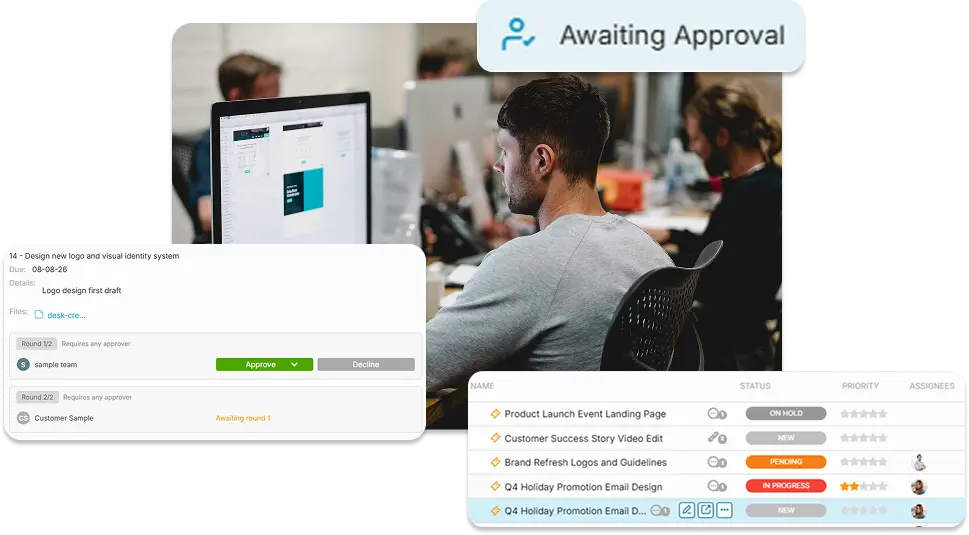
When you need a client’s go-ahead, OneDesk sends the approval request by email. The client approves or replies with comments, and those comments appear as public comments on the item in the portal. Employees also get notified and all decisions and comments live right on the relevant task.
Also built into OneDesk
| Feature | Why it matters for agencies and firms |
|---|---|
| Free, unlimited customer accounts | Invite every client stakeholder at no per-seat cost |
| Branding | The portal looks like your firm, not your software vendor |
| Help desk and project management in one | Support tickets and project tasks share one platform and one queue |
| Timesheets and invoicing | Logged time flows into budgets and client invoices |
| SLA policies | Set and track response targets per client or request type |
How to set up a client portal for your agency in 7 steps
These steps work in any portal tool. Plan for roughly two weeks: one to configure and pilot with 2 or 3 friendly clients, and one to roll out to everyone else.
- Define your request types. Start with 3 to 5 types, such as New project, Change request, Support issue and Question. More than 5 and clients start guessing.
- Build one form per request type. Keep each to 7 fields or fewer. Make the essentials required: summary, details, due date, priority and attachments.
- Set up routing and response targets. Send each request type to a team or project automatically. Set a first-response target, such as 1 business day for new work and 4 business hours for urgent support.
- Choose what clients can see. Decide whether clients see tickets, tasks or both, then pick the visible properties for each. Start at the Standard level of the transparency dial (status, priority) and open up from there. By default the portal in OneDesk is limited to these basic properties. Internal notes are always private.
- Standardize your status labels. Use 5 or 6 plain-language statuses clients will see, for example Received, In progress, Waiting on you, In review, Done. “Waiting on client” tells clients when the ball is in their court.
- Set up messaging and file sharing. Turn on client replies by portal and email. Agree on one rule for the team: client conversations happen on the ticket or task, not in side emails.
- Brand it and launch it. Add your logo, colors and a login message. Link the portal from your email signature, website and invoices. Then send every client a short “here’s how to reach us now” note with the link.
Recommended defaults and what to measure
Use these as starting points, then tune them after your first 30 days.
| Setting | Recommended default | Why |
|---|---|---|
| Request types | 3 to 5 | Enough to route, few enough to choose quickly |
| Fields per form | 7 or fewer | Longer forms get skipped in favor of email |
| What clients see | Tickets and tasks for their own organization only | Protects confidentiality across clients |
| Visible properties | Status, priority and due date | Clear progress without exposing internal detail |
| Internal notes | Private | Keeps team discussion candid |
| Client messaging | On, by portal and email | Clients can reply the way they already work |
| First response, new work | 1 business day | Sets a clear, achievable expectation |
| First response, urgent support | 4 business hours | Matches typical service agreements |
The 4 numbers to track
| Metric | What it tells you | Healthy direction |
|---|---|---|
| Portal adoption | % of requests that arrive through the portal, forms or tracked email | Up, toward 80% or more |
| Status-check emails | How often clients ask “where are we?” | Down |
| Side-channel messages | Client conversations happening outside the ticket or task | Down |
| First-response time | Hours from request to first reply | Within your targets |
FAQ
It’s a secure, branded online space where an agency’s clients submit requests, track status and progress, message the team and share files. It replaces scattered email threads with one shared record of the work.
Yes. In OneDesk you choose whether clients see tickets, tasks or both, and which properties are visible on them, such as status, priority or due date. Internal notes stay private.
Yes. Each ticket and task has its own conversation thread, and clients can reply in the portal or by email. Files are shared right on the item, so briefs, assets and deliverables stay with the work.
Not with OneDesk. Customer accounts are free and unlimited, so you can invite every stakeholder on the client side.